


Should You Buy an 8GB, 12GB, or 16GB GPU? The Smart Gaming Guide for 2026
If you are buying a graphics card in 2026, VRAM is one of the easiest specs to misunderstand. Some gamers will tell you 8GB is dead. Others will say 16GB is the new minimum. Then someone else will remind you that a slower GPU with more VRAM can still lose to a faster card with less memory.
So what should you actually buy? 8GB vs 12GB vs 16GB VRAM, which do you choose?
The real answer is not “always buy the most VRAM.” The smart answer depends on your resolution, the games you play, the settings you use, your budget, and how long you plan to keep the card.
This guide cuts through the noise and helps you decide whether an 8GB, 12GB, or 16GB GPU makes the most sense for your gaming PC in 2026.
The Quick Answer
If you just want the short version, here it is:
| Your Situation | Best VRAM Choice | Why |
|---|---|---|
| 1080p esports, older games, indie games, tight budget | 8GB | Still enough for many lighter games if the GPU itself is decent. |
| Modern 1080p Ultra or 1440p High gaming | 12GB | The best balance of price, performance, and future headroom for most gamers. |
| Heavy mods, ultra textures, demanding AAA games, long upgrade cycle | 16GB | Gives more breathing room when games start loading huge assets. |
30-Second Buying Guide
If you just want to know what to buy without reading the entire article, use this quick decision table.
| If this sounds like you… | Recommended VRAM |
|---|---|
| You mainly play esports titles like Counter-Strike 2, Valorant, Rocket League, or Fortnite at 1080p and you’re on a budget. | 8GB |
| You play modern AAA games at 1080p Ultra or 1440p High and want the best balance of price and longevity. | 12GB |
| You use heavy mods, texture packs, play demanding open-world games, or want to keep your GPU for many years. | 16GB |
Simple rule: Buy the fastest graphics card that has enough VRAM for your needs. Don’t sacrifice GPU performance just to get a bigger VRAM number.
The simple answer is this:
8GB is the budget option. 12GB is the smart middle ground. 16GB is the headroom option.
For most gamers in 2026, 12GB is the safest recommendation. It avoids many of the limits of 8GB cards without forcing you into expensive high-end territory.
But that doesn’t mean every player needs 12GB or 16GB. If you mostly play competitive games at 1080p, an 8GB GPU can still be a sensible purchase. If you play modded open-world games or want to keep your GPU for many years, 16GB starts making more sense. The same principle applies to gaming laptops, where factors like cooling, GPU power limits and overall build quality are just as important as VRAM. If you’re considering a portable gaming system, our guide to the best RTX 5060 gaming laptops explains what really matters before you buy.
The mistake is buying based on the biggest number instead of your actual use case.
Best GPUs to Buy in 2026
If you’re still unsure which graphics card to choose, these are the models we’d consider at each VRAM tier. The important thing is not to buy based on memory capacity alone. A faster GPU with enough VRAM for your games is usually a better purchase than a slower card with a larger memory number.
Best 8GB GPU Recommendations
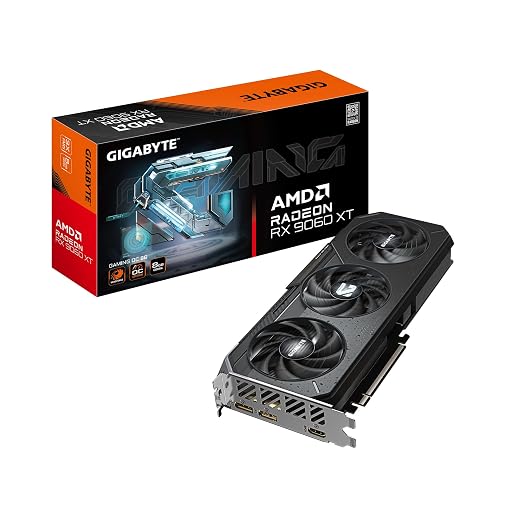
Radeon RX 9060 XT 8GB — Our Main 8GB Pick
If you’ve decided that an 8GB graphics card still fits the games, resolution and budget you’re working with, the Radeon RX 9060 XT 8GB is the straightforward choice we’d consider first.
It makes the most sense for budget-conscious 1080p gamers who want strong modern GPU performance and are willing to use sensible texture settings in the most VRAM-heavy games rather than paying substantially more for extra memory they may not need.
Best suited for: 1080p gaming, esports, lighter AAA games and buyers who care more about getting a strong GPU for the money than maxing every texture setting for years to come.
If 8GB genuinely suits your use case, this is the card we’d check first. Compare the current price below before moving up to a higher-VRAM tier purely because the number on the box is larger.
Intel Arc B570 10GB — The Budget Alternative With More VRAM
The Intel Arc B570 10GB does not technically belong in the 8GB category, and that is exactly why it is worth considering here. Its 10GB of VRAM gives budget buyers a little more memory headroom than a conventional 8GB card without automatically pushing them into the 12GB price tier.
This is not a case of simply choosing the card with more memory. The B570 should make sense because of its total price, gaming performance and the features you actually need, not because 10GB automatically makes it better than every 8GB alternative.
Best suited for: Budget-focused gamers who want more than 8GB of VRAM and find the B570 at a genuinely competitive price compared with the RX 9060 XT and lower-end 12GB cards.
If the Arc B570 is meaningfully cheaper or its 10GB capacity better suits the games you play, it becomes a sensible alternative. Check the current offer below before deciding.

Best 12GB GPU Recommendations
Radeon RX 7700 XT 12GB — Our Main 12GB Pick
If you’ve decided that 12GB is the right VRAM tier for your gaming PC, the Radeon RX 7700 XT 12GB is the stronger all-round recommendation here.
It gives you more memory headroom than an 8GB card while also delivering the level of GPU performance that makes 12GB worthwhile for demanding 1080p and 1440p gaming. That combination is exactly why we treat 12GB as the sweet spot for many gamers.
Best suited for: Gamers targeting modern 1080p Ultra or 1440p High settings who want a balanced combination of GPU performance, VRAM capacity and long-term usability without immediately moving into a more expensive 16GB tier.
If the RX 7700 XT fits your budget, this is the 12GB card we’d choose first. Check the current price below before spending substantially more just to move up another VRAM tier.

GeForce RTX 3060 12GB — A Lower-Cost Renewed Alternative
The GeForce RTX 3060 12GB is a very different recommendation. It still offers a useful 12GB memory capacity, but it is an older GPU and the particular model included here is renewed, so price matters far more than the VRAM number.
Do not choose it over a substantially faster modern card simply because both GPUs have 12GB. The RTX 3060 makes sense when the renewed price is low enough to compensate for its older performance level and you specifically want an affordable 12GB option.
Best suited for: Budget-conscious buyers who want 12GB of VRAM and find a renewed RTX 3060 at a genuinely attractive price compared with newer alternatives.
This recommendation depends heavily on price. If the renewed RTX 3060 is cheap enough to make sense for your budget, check the current offer below. Otherwise, we’d spend more on the RX 7700 XT or reconsider which performance tier you actually need.

Best 16GB GPU Recommendations
Radeon RX 9070 XT 16GB — Our Main 16GB Pick
If you’ve decided that 16GB is the right VRAM tier for your next graphics card, the Radeon RX 9070 XT 16GB is the model we’d consider first.
It combines substantial memory capacity with the level of GPU performance that makes 16GB genuinely useful for demanding modern games, higher settings, heavy textures and buyers who want more long-term headroom than an 8GB or 12GB card provides.
Best suited for: Gamers building a powerful system for demanding 1440p gaming who want plenty of VRAM headroom without automatically jumping into the most expensive enthusiast GPU tier.
If you want 16GB in a genuinely high-performance gaming card without automatically paying flagship-class prices, the RX 9070 XT is the one we’d check first. Compare the current price below before moving further up the GPU stack.

GeForce RTX 5080 16GB — The Premium Performance Choice
The GeForce RTX 5080 16GB is here for a completely different buyer. You are not choosing it simply because you need 16GB of VRAM. You are considering it because you want a much higher performance class and have the budget and supporting hardware to justify it.
This is the important distinction: the RTX 5080 and RX 9070 XT may both have 16GB of memory, but that does not make them interchangeable. VRAM capacity is only one part of what determines how fast a graphics card actually is.
Best suited for: Enthusiast gamers targeting high-resolution, high-refresh-rate gaming who are prepared to pay considerably more for GPU performance rather than simply additional VRAM.
Do not buy the RTX 5080 merely to get 16GB. Buy it when you specifically need the performance class it provides. If that’s the level of GPU you’re shopping for, check the current price below and compare the total cost against the RX 9070 XT before deciding.

Final buying tip: Don’t choose a graphics card simply because it has more VRAM. Buy the fastest overall GPU that provides enough memory for the games, settings and resolution you actually use.
If you are building a complete system around your GPU, also read our Best Gaming PC Builds for Every Budget.
What VRAM Actually Does
VRAM, or video memory, is the memory built into your graphics card. It stores the data your GPU needs while rendering games. That includes textures, frame buffers, shadows, geometry, lighting data, ray tracing data, and other visual assets.

When a game fits comfortably inside your VRAM limit, things usually feel smooth. When the game runs out of VRAM, the system may have to move data through slower system RAM or storage. That is when you can start seeing stutter, hitching, texture pop-in, sudden frame drops, or settings that feel worse than they should.
This is why VRAM matters more today than it did years ago. Modern games can use larger textures, bigger worlds, more detailed environments, heavier effects, and more advanced rendering features.
But here is where many gamers get tricked:
More VRAM does not automatically mean more FPS.
If a game only needs 7GB of VRAM, having 16GB does not magically make it faster. Extra VRAM helps when the game needs it. If the game does not need it, then GPU core performance, memory bandwidth, architecture, CPU performance, drivers, and game optimization matter more.
That is why a faster 12GB GPU can easily outperform a slower 16GB GPU.
If you want a broader explanation of why games perform badly, read our guide on why PC games run badly, FPS drops, stutter, and bottlenecks happen.
When an 8GB GPU Still Makes Sense
An 8GB GPU is not automatically useless in 2026. That kind of advice is too lazy. An 8GB graphics card can still make sense if you mostly play:
- Esports games at 1080p
- Older AAA games
- Indie games
- Competitive shooters
- Low-end friendly games
- Free-to-play titles on tuned settings
- Games where you are happy using medium or high textures instead of ultra textures
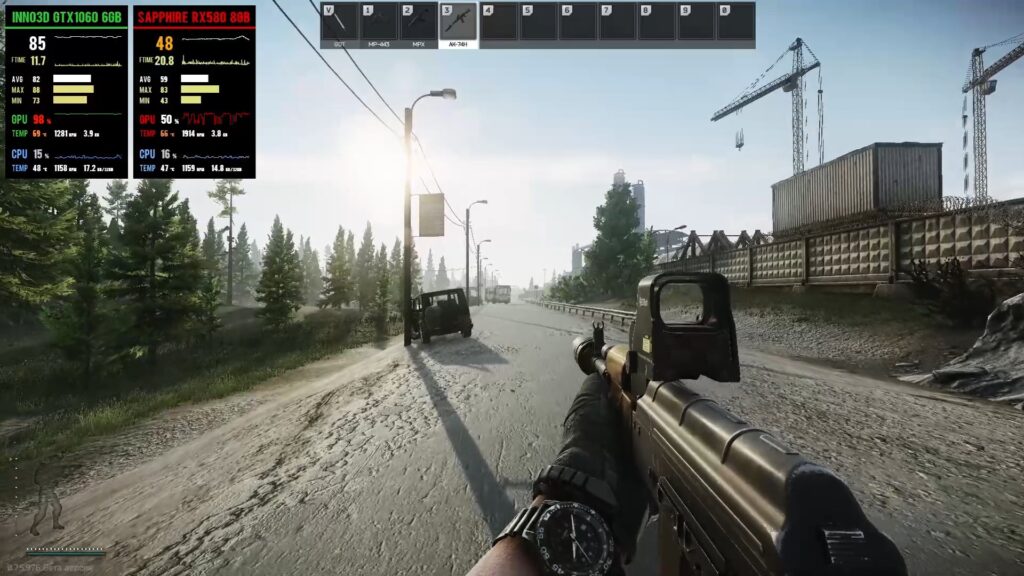
If your main games are things like Counter-Strike 2, Valorant-style shooters, Rocket League-style games, Fortnite on sensible settings, older RPGs, strategy games, or low-end PC titles, an 8GB card may still be enough.
The problem starts when people buy an 8GB GPU expecting it to behave like a long-term 1440p Ultra card. That is where disappointment begins.
8GB is best treated as a budget 1080p option. It can still deliver a good experience, but you need realistic expectations. You may need to lower texture quality in newer games. You may need to avoid ultra presets. You may need to skip heavy ray tracing. You may not get the same long-term comfort as someone buying a 12GB or 16GB card.
That does not mean 8GB is worthless. It means you need to buy it for the right job.
Buy an 8GB GPU if:
- You are on a strict budget.
- You mainly game at 1080p.
- You play esports, older games, or lighter titles.
- You do not care about ultra textures.
- The 8GB card is clearly cheaper or faster than the alternatives in your budget.
Avoid an 8GB GPU if:
- You want a long-term 1440p card.
- You play modern AAA games at high or ultra settings.
- You use texture packs or heavy mods.
- You hate lowering settings.
- You want to keep the card for four or five years.
If you want a deeper look at this exact issue, read Why 8GB VRAM GPUs Are Already Struggling in Modern Games.
Why 12GB Is Often the Sweet Spot
For most gamers buying a GPU in 2026, 12GB is the safest middle ground.
It gives you more breathing room than 8GB without automatically forcing you into a more expensive high-end card. This matters because many gamers are not trying to build monster 4K machines. They are trying to get strong 1080p or 1440p performance without wasting money.
That is exactly where 12GB works well. A 12GB GPU makes sense if you:
- Play modern AAA games
- Use a 1440p monitor
- Want high settings without constantly worrying about texture limits
- Keep your GPU for several years
- Want better value instead of chasing the most expensive card
- Want more safety than 8GB without overbuying
This is the VRAM tier I would treat as the main recommendation for most BuiltToFrag readers. It is not the flashiest answer, but it is probably the smartest one.
12GB gives you enough room for many modern games while still leaving budget for other parts that matter: GPU core performance, CPU balance, RAM, SSD speed, cooling, and a reliable power supply.
That last part matters. A gaming PC is not just a graphics card. If you spend all your money chasing extra VRAM and ignore the rest of the system, you can still end up with bad performance.
If you are worried that a GPU upgrade may not fix your FPS, read Stop Wasting Money on GPUs That Won’t Improve FPS.
Who Should Buy a 16GB GPU?
16GB is not stupid. It is just not automatically necessary for everyone.
You should consider a 16GB GPU if you:
- Use high-resolution texture packs
- Play heavily modded games
- Play demanding open-world AAA games
- Want more long-term headroom
- Use 1440p Ultra settings often
- Plan to keep the same GPU for many years
- Want more breathing room for future releases
16GB becomes more attractive when you are not just trying to play games today, but trying to avoid feeling boxed in later.
Modded games are a perfect example. A game might run fine on 8GB in its normal state, then suddenly become much heavier once you add texture packs, reshades, ENBs, lighting mods, and large content mods.
Open-world games can also be rough on VRAM, especially when they use high-resolution textures, dense environments, large draw distances, and heavy effects.
But this is where you need to stay smart:
Do not buy a much weaker GPU just because it has 16GB of VRAM.
A weak 16GB card can still perform worse than a stronger 12GB card. If the GPU chip itself is not fast enough, the extra memory will not save it.
Buy 16GB when your games, settings, and upgrade timeline justify it. Do not buy it just because the box looks better.
For more upgrade traps, read 7 GPU Upgrade Mistakes That Can Ruin Your PC Build.
VRAM vs Actual GPU Performance
This is the part that gets ignored in too many GPU arguments:
VRAM is not the same thing as GPU power.
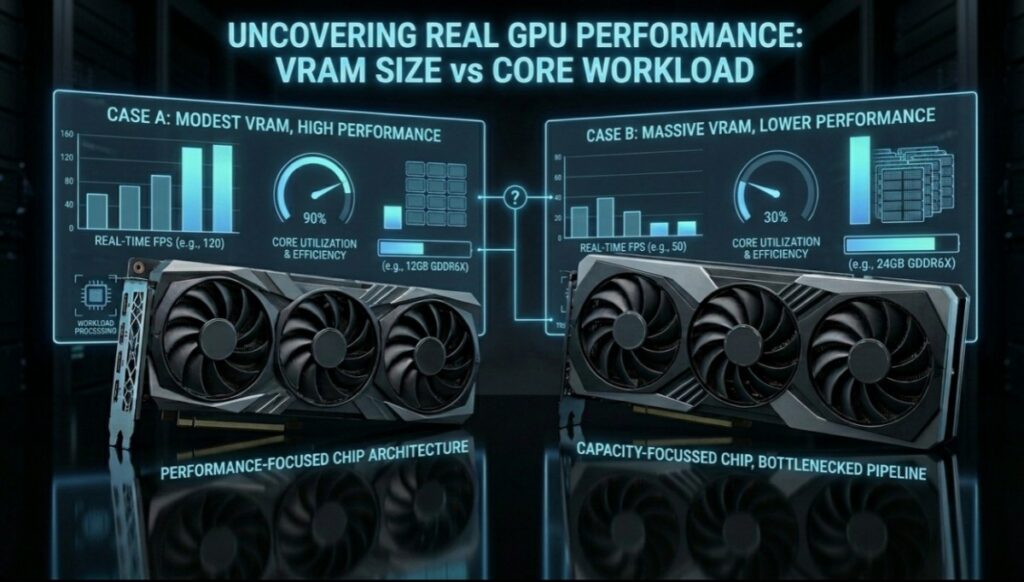
VRAM helps the card hold data. It does not decide everything about how fast the card can process that data. For gaming performance, you also need to care about:
- GPU architecture
- Shader performance
- Memory bandwidth
- Cache design
- Power limits
- Cooling
- Driver support
- Game optimization
- CPU bottlenecks
This is why comparing cards purely by VRAM size is dangerous. A 16GB card is not automatically better than a 12GB card. An 8GB card is not automatically worse than every 12GB card.
The better question is:
Does this GPU have enough VRAM for my games, and is the GPU itself fast enough for the settings I want?
If the answer to both is yes, you are probably making a good choice.
If you are only buying the card because the VRAM number looks bigger, slow down.
How Much VRAM Do You Need by Resolution?
Resolution has a big impact on how much pressure you put on your GPU. A 1080p gamer and a 4K gamer are not asking the same thing from a graphics card.
1080p Gaming
For 1080p gaming, 8GB can still work well if you play lighter games or use sensible settings. This is especially true for esports titles, older games, and games that do not rely on massive texture packs.
However, if you want to play newer AAA games at 1080p Ultra, 12GB becomes a safer choice. It gives you more room for high textures and future releases.
Best choice for most 1080p gamers: 8GB for budget builds, 12GB for better long-term comfort.

1440p Gaming
1440p is where 12GB starts making much more sense. You are pushing more pixels, and many gamers expect higher settings at this resolution.
An 8GB GPU can still run some games at 1440p, but it is not the VRAM tier I would target for a fresh 1440p purchase in 2026 unless the price is excellent and your expectations are realistic.
Best choice for most 1440p gamers: 12GB minimum, 16GB if you want more headroom.
4K Gaming
4K is much more demanding. At this level, you are usually outside budget gaming territory. If you are serious about 4K gaming, especially with high textures, advanced effects, or ray tracing, 16GB becomes much more attractive.
That said, BuiltToFrag readers should be honest here. If your budget is tight, chasing 4K may be the wrong goal. A strong 1440p experience often makes more sense than a compromised 4K experience.
Best choice for 4K gaming: 16GB or more, paired with a GPU that is actually powerful enough for 4K.
Real Buying Scenarios: Which GPU Should You Choose?
Scenario 1: “I Mostly Play Esports at 1080p”
If you mostly play competitive games at 1080p, an 8GB GPU can still be enough. Esports players often lower settings anyway to improve visibility, reduce input lag, and keep frame rates high.
Best choice: 8GB or 12GB, depending on price.

If the 12GB option is only slightly more expensive, it may be worth it. If the price gap is large, 8GB can still be the better value.
Scenario 2: “I Play Modern AAA Games at 1080p Ultra”
This is where 12GB starts to make a lot of sense. Newer games can use more memory, especially with high textures and advanced effects.
Best choice: 12GB.
You do not always need 16GB for 1080p, but 8GB can start feeling tight in some modern titles.
Scenario 3: “I Play at 1440p”
1440p is where VRAM pressure becomes more noticeable. You are pushing more pixels, and many gamers also expect higher texture quality at this resolution.
Best choice: 12GB minimum, 16GB if the price makes sense.
For 1440p, I would avoid buying a weak 8GB card unless your expectations are realistic and your games are not too demanding.
Scenario 4: “I Use Mods and Texture Packs”
If you love modding games, VRAM matters more. Texture packs, reshades, ENBs, lighting mods, and large open-world mods can push memory usage hard.
Best choice: 16GB.

This is one of the clearest cases where extra VRAM is not just marketing. It can prevent memory pressure and reduce the chance of hitching.
Scenario 5: “I Have a Weak CPU or Old PC”
If the rest of your PC is weak, do not throw all your money at VRAM. Your CPU, RAM, storage, and power supply can still hold you back.
Best choice: A balanced upgrade.
Before buying a GPU, check whether your system can actually support it properly. Our Complete Gaming PC Hardware Guide can help you avoid wasting money on the wrong part.
Scenario 6: “I Want This GPU to Last as Long as Possible”
If you plan to keep your GPU for four or five years, VRAM headroom matters more. You do not want to buy a card that already feels tight in the games you care about.
Best choice: 12GB at minimum, 16GB if your budget allows and the GPU is strong enough.
But again, do not buy a weak card just because it has more memory. Longevity requires both VRAM and real GPU power.
The Biggest VRAM Myths Gamers Still Believe
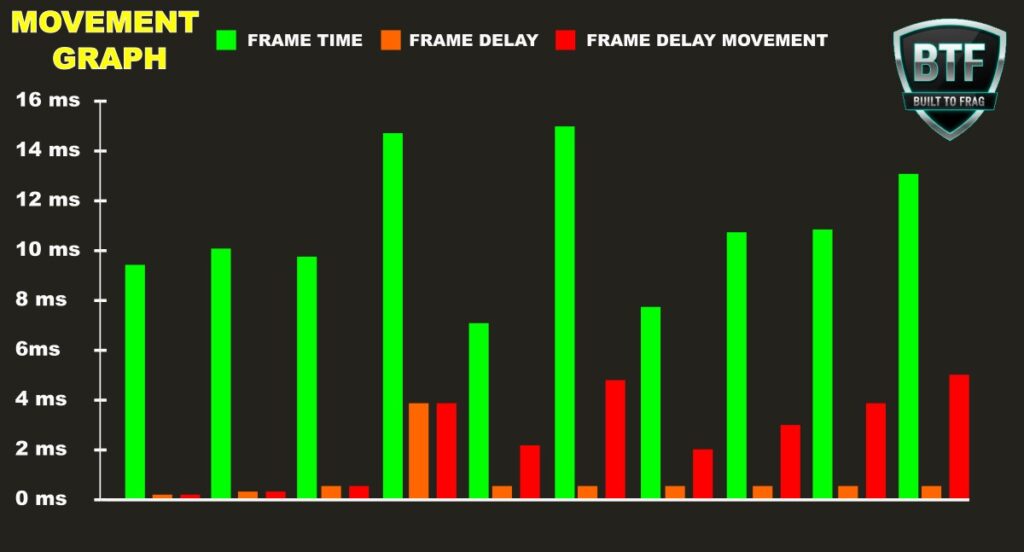
Myth 1: More VRAM Always Means More FPS
No. More VRAM only helps when the game actually needs it. If the game already fits within your available VRAM, extra memory usually will not increase FPS.
A faster 12GB GPU can beat a slower 16GB GPU. Do not judge a graphics card by memory size alone.
Myth 2: 8GB Is Completely Dead
8GB is weaker than it used to be, especially for new AAA games with high textures, but it is not dead for every player.
For 1080p esports, older games, indie games, and budget systems, 8GB can still make sense.
The real issue is buying 8GB for the wrong job.
Myth 3: 16GB Is Always Future-Proof
16GB gives you more breathing room, but no GPU is magically future-proof. A weak 16GB card can still age badly if the GPU core is not strong enough.
Future-proofing is not just about VRAM. It is about overall performance, drivers, architecture, bandwidth, and whether the card can handle the settings you want.
Myth 4: VRAM Is the Only Reason Games Stutter
VRAM can cause stutter, but so can weak CPUs, slow storage, bad drivers, shader compilation, overheating, background apps, RAM issues, and poor game optimization.
If your games stutter even on low settings, read Why Your PC Stutters Even on Low Settings.
Myth 5: You Should Always Pick the Card With the Most Memory
This is how people waste money.
The best GPU is not always the one with the biggest VRAM number. The best GPU is the one that gives you the strongest real gaming performance for your budget, with enough memory for the games and settings you actually use.
Five Questions to Ask Before You Buy
Before you buy an 8GB, 12GB, or 16GB GPU, ask yourself these questions:
- What resolution do I actually play at?
1080p, 1440p, and 4K do not have the same VRAM needs. - Which games do I play most?
Esports games and huge AAA games do not stress a GPU the same way. - Do I use mods or high-resolution texture packs?
If yes, extra VRAM becomes more useful. - How long do I plan to keep this GPU?
The longer you keep it, the more headroom matters. - Am I sacrificing GPU speed just to get more VRAM?
If yes, compare real gaming performance before buying.
This is the buying rule I would use:
Buy the strongest overall GPU that has enough VRAM for your real use case.
Not the biggest number. Not the loudest marketing. Not the card Reddit is arguing about this week. Your games. Your monitor. Your budget.
Is It Worth Paying More for Extra VRAM?
Sometimes yes, sometimes no.
If the 12GB version of a graphics card costs only a little more than the 8GB model, the upgrade is often worthwhile. The extra memory provides more breathing room for newer games and can make 1440p gaming more comfortable.
Likewise, if a 16GB model is only slightly more expensive than a 12GB version and you enjoy heavily modded games or plan to keep your GPU for several years, the additional VRAM may be a smart investment.
However, if getting more VRAM means buying a significantly slower graphics card, the extra memory may not translate into better gaming performance.
As a general rule: it is usually better to buy a faster 12GB GPU than a slower 16GB GPU.
Always compare real gaming benchmarks and overall performance instead of choosing purely based on the amount of VRAM.
FAQs About 8GB, 12GB, and 16GB GPUs
Is 8GB VRAM enough for gaming in 2026?
Yes, but only for the right type of gamer. 8GB can still be enough for 1080p esports, older games, indie titles, and budget builds. It is less ideal for demanding AAA games at high settings, especially if you want the card to last for several years.
Is 12GB VRAM enough for 1440p?
For many gamers, yes. 12GB is a strong choice for 1440p High settings and modern games. It gives more breathing room than 8GB without forcing you into expensive 16GB cards.
Is 16GB VRAM overkill for 1080p?
For normal 1080p gaming, often yes. But it can make sense if you use heavy mods, high-resolution texture packs, or plan to keep the GPU for a long time.
Does more VRAM increase FPS?
Only if the game is running out of VRAM. If the game already fits within your memory limit, extra VRAM usually will not increase FPS. GPU core performance still matters more in many cases.
Should I buy a slower 16GB GPU or a faster 12GB GPU?
Usually, the faster 12GB GPU is the better gaming choice unless you specifically need the extra memory for mods, high-resolution textures, or certain demanding games.
Does DLSS or FSR reduce VRAM usage?
Upscaling can reduce rendering load, but it does not remove the need for enough VRAM. Features like DLSS can improve performance, but you still need enough memory for textures and game assets. You can read more from NVIDIA’s official DLSS page.
How much VRAM should I buy for future-proofing?
If you want a GPU to last several years, 12GB should be treated as the safer minimum for many modern gamers, while 16GB gives more breathing room. Just remember that VRAM alone does not make a card future-proof. The GPU itself also needs enough performance.
Is VRAM more important than the GPU chip?
No. VRAM matters, but the GPU chip still matters heavily. A graphics card needs both enough memory and enough processing power. Do not buy a weak card just because it has more VRAM.
Final Verdict: 8GB vs 12GB vs 16GB GPU
Here is the honest BuiltToFrag verdict:
- Buy 8GB if you are on a tight budget, play mostly 1080p esports, older games, indie titles, or low-end friendly games.
- Buy 12GB if you want the best balance for modern 1080p and 1440p gaming. This is the sweet spot for most gamers in 2026.
- Buy 16GB if you use heavy mods, high-resolution textures, demanding AAA settings, or want more long-term headroom.
The smartest choice is not always the biggest VRAM number. It is the card that gives you the best real-world performance for your budget.
If you are still unsure, remember this:
8GB is the budget option. 12GB is the smart option. 16GB is the headroom option.
Buy for your games, your monitor, and your budget — not for internet arguments.
Honestly this cleared up a lot for me. I upgraded from an 8GB card last year and didn’t think it’d make much difference, but games actually run way smoother now. I still think 8GB is fine if you’re just playing older or lighter games though, no need to overspend if you don’t need it. Thanks for breaking it down like this, easy to understand.
Exactly my point, that’s the balance I was hoping to get across. 8GB certainly isn’t suddenly useless, especially for older or lighter games, but once you start pushing newer games and higher settings, the extra VRAM can make a noticeable difference. Glad the article helped clear things up, and thanks for sharing your experience!