Are 4-Core CPUs Still Enough for Gaming in 2026? When You Actually Need to Upgrade
If your gaming PC still has a quad-core processor, it is easy to look at modern 6-core and 8-core CPUs and assume yours has finally reached the end of the road. But are 4-core CPUs still enough for gaming in 2026? In many PCs, yes. The bigger question is whether your particular 4-core CPU is actually limiting the games you play.
A newer 4-core CPU with eight threads is very different from an old 4-core, 4-thread processor. The GPU you pair it with matters. So does the game, the FPS you are trying to reach, what is running in the background and how consistent your frametimes are.
That means upgrading simply because Task Manager says you have four cores can be a waste of money. This guide will help you work out where quad-core CPUs still make sense, where they start causing problems and, most importantly, how to test whether your CPU is genuinely holding your gaming PC back before you replace anything.
The Quick Answer: Yes, But Not for Every Gaming PC
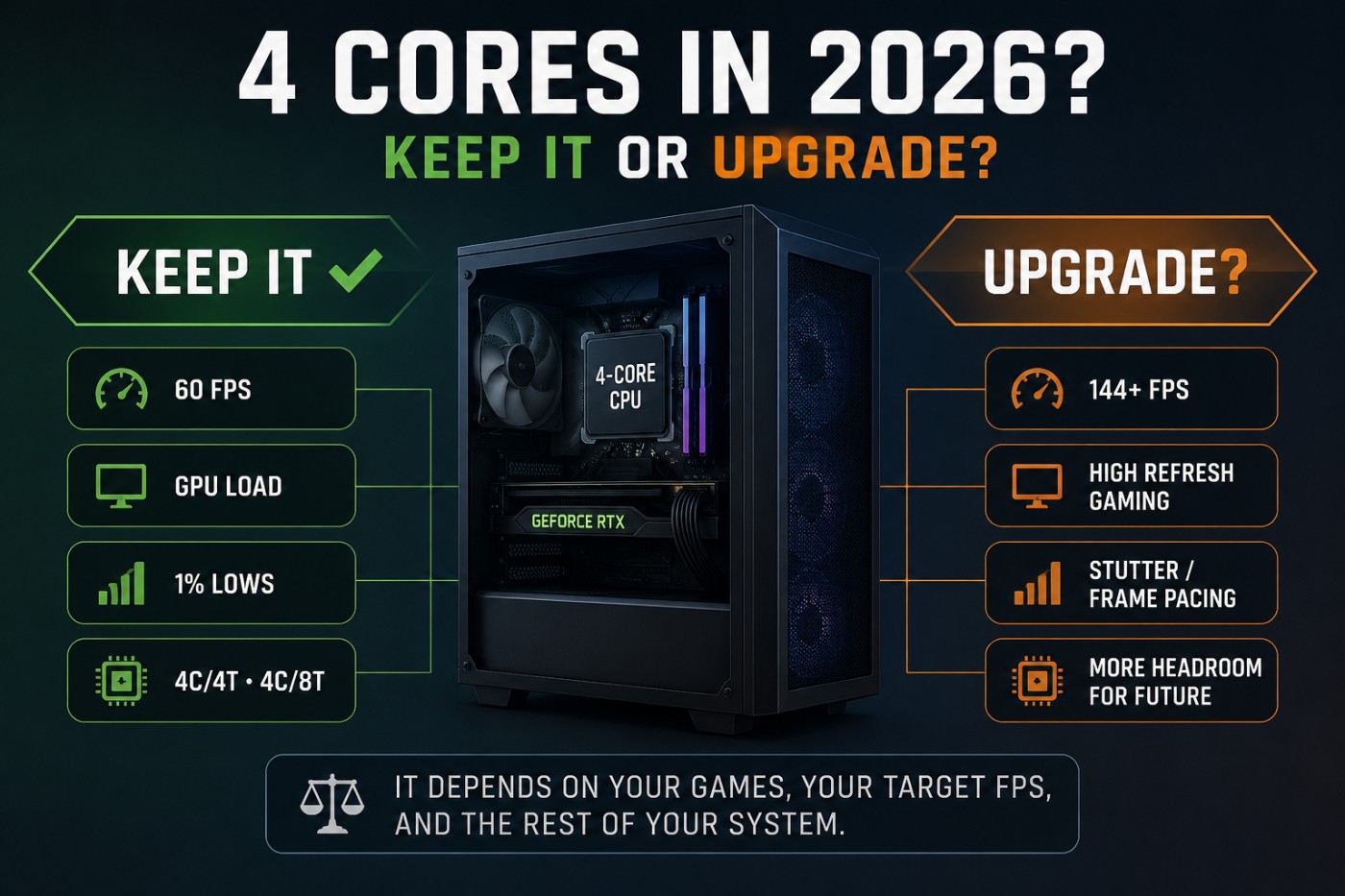
A 4-core CPU can still be enough for gaming in 2026. If your games run smoothly at your target FPS with good frame pacing, there may be no reason to replace it.
Quad-cores are more easily exposed by CPU-heavy games, powerful GPUs, high-refresh gaming and background apps. Target FPS matters too: a CPU that handles 60 FPS comfortably may struggle when pushed to 144, 165 or 240 FPS.
| Gaming Situation | 4-Core Outlook |
|---|---|
| Older or lightweight games around 60 FPS | Often perfectly usable |
| 4 cores / 8 threads with a modest GPU | Often still viable |
| Modern AAA gaming around 60 FPS | Depends heavily on the CPU and game |
| Older 4-core / 4-thread CPU | Increasingly restrictive |
| 144 to 165+ FPS competitive gaming | CPU limitations become easier to expose |
| Powerful modern GPU paired with an old quad-core | CPU bottleneck becomes more likely |
| Gaming with Discord, browsers and other background apps | Less spare CPU headroom |
| Building a completely new gaming PC | Four cores are difficult to justify deliberately |
That table is only a starting point. A processor should not be condemned because it happens to have four cores. What matters is whether those cores can deliver the performance your games actually require.
Why “4 Cores” Doesn’t Tell You How Fast a CPU Is
Core count is often treated like a performance score, but two 4-core CPUs can perform very differently in games. Architecture, instructions per clock, clock speed, cache, memory performance and thread support all affect what those four cores can actually do.
That’s why saying a game “needs six cores” or that every quad-core is obsolete is too simplistic. A newer CPU with fewer cores can sometimes outperform an older processor with more of them.
Cache matters too. Games constantly need data, and a stronger architecture with more effective cache can keep the CPU working efficiently. Two processors with the same core count can therefore deliver very different gaming performance.
Your GPU also changes the equation. Pair an older quad-core with a modest GPU and the graphics card may reach its limit first. Install a much faster GPU and the CPU may suddenly become the component holding FPS back.
If you are trying to work out whether a specific processor and graphics card make sense together, our guide to matching your GPU to your CPU goes deeper into that relationship.
Core count tells you how the CPU is configured. It does not tell you how fast that CPU will be in your games.
4 Cores / 4 Threads vs 4 Cores / 8 Threads
Even among quad-core processors, there is another important distinction: four cores with four threads and four cores with eight threads are not the same thing.
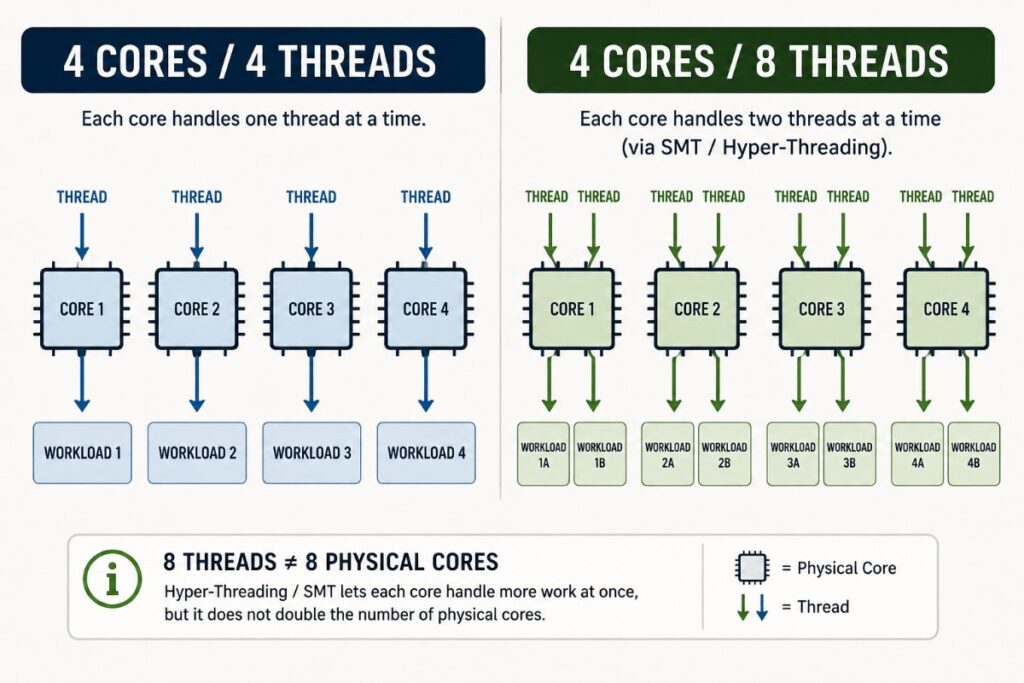
A 4-core, 4-thread processor gives each physical core one hardware thread. Once those cores are heavily occupied by the game, Windows and background applications have less scheduling headroom available.
A 4-core, 8-thread CPU uses technologies such as Intel Hyper-Threading or AMD simultaneous multithreading to allow each physical core to work with two logical threads. That does not turn four physical cores into eight physical cores, but it can help the CPU make better use of available execution resources.
For gaming, that extra thread capacity can become valuable when the game itself is busy while Discord, a browser, launchers, anti-cheat software, monitoring tools and Windows services are all competing for processor time.
| CPU Layout | General 2026 Outlook | Main Concern |
|---|---|---|
| Older 4C/4T | Increasingly constrained | CPU-heavy games and multitasking |
| Strong 4C/4T | Still situationally useful | Limited thread headroom |
| Older 4C/8T | Can remain usable | Older architecture and per-core performance |
| Stronger 4C/8T | Often viable with sensible expectations | High FPS and demanding modern workloads |
Do not take that table to mean every 4C/8T processor automatically beats every 4C/4T processor. A much newer 4C/4T chip can still have stronger individual cores, better cache and a more efficient architecture.
The point is simply that saying “I have a quad-core” still does not tell us enough. We need to know which quad-core, how many threads it has and what you are asking it to do.
Where 4-Core CPUs Still Work Well
Quad-core gaming makes the most sense when the CPU is not being asked to deliver extreme frame rates or manage a particularly heavy game workload.
Esports and Lightweight Games
Games such as Valorant, League of Legends, Rocket League and many older competitive titles can still run well on relatively modest processors.
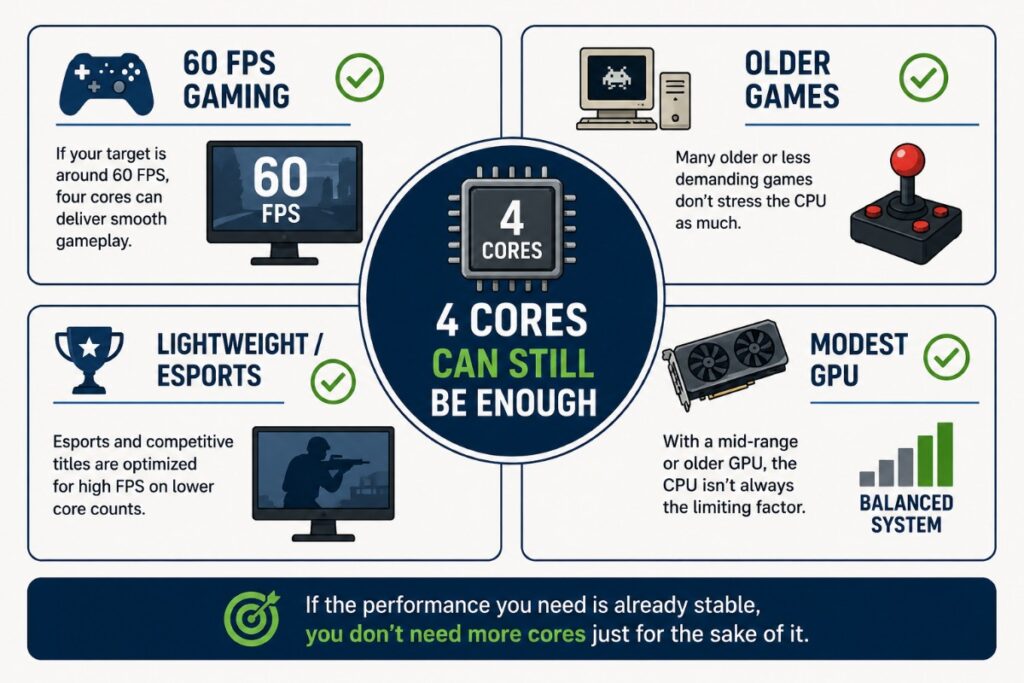
There is an important catch, though. Competitive games may be lightweight enough to run on an older CPU, but competitive players often want very high FPS. Asking a quad-core to maintain 200 FPS or more is a very different workload from simply asking it to deliver a smooth 60 FPS.
So “esports game” does not automatically mean “CPU doesn’t matter.” The FPS target still matters.
Older PC Games
If most of your library consists of older titles, indie games or games built around relatively light CPU workloads, upgrading purely because you only have four cores makes even less sense. There is no prize for having spare CPU cores while playing a game that never needed them.
This is particularly relevant to weaker gaming PCs. Matching the games you play to the hardware you actually own can often save far more money than trying to turn an old system into a modern high-end machine. Our Low-End PC Gaming Guide covers what actually makes sense on modest hardware.
GPU-Limited Gaming
A 4-core CPU can also remain entirely usable when your graphics card is already the main performance limit.
Imagine your GPU is working flat out to deliver roughly the performance you want while the CPU still has enough headroom to keep it supplied with work. Replacing the processor may improve benchmark numbers in some situations, but it may not materially change what you experience in the games you actually play.
This is especially important for budget gaming PCs. Spending hundreds on a new CPU, motherboard and possibly RAM makes very little sense if the graphics card is still going to determine most of your gaming performance afterward.
60 FPS Gaming
High-refresh gaming has changed what many gamers expect from a CPU, but 60 FPS remains a perfectly valid target for plenty of systems and games.
If your quad-core can consistently deliver that target with good frame pacing, then moving to a faster CPU purely because six or eight cores sound more modern may accomplish very little. The question is not whether another processor can produce more FPS. The question is whether you actually need that additional performance.
Where 4-Core CPUs Start to Struggle
Four cores become a problem when the CPU can no longer handle game logic, physics, AI and other work fast enough to maintain the performance you want. The point where this happens varies enormously between games.
CPU-Heavy Modern Games
Large open worlds, complex simulations, heavy NPC activity and strategy games can put serious pressure on an older quad-core. Strategy games are a good example because performance can deteriorate as the simulation becomes more complex. Our guide to late-game strategy performance and CPU bottlenecks explains why.
A game being able to run on four cores also does not guarantee good 1% lows or consistent frametimes under heavy CPU load.
High-Refresh Gaming
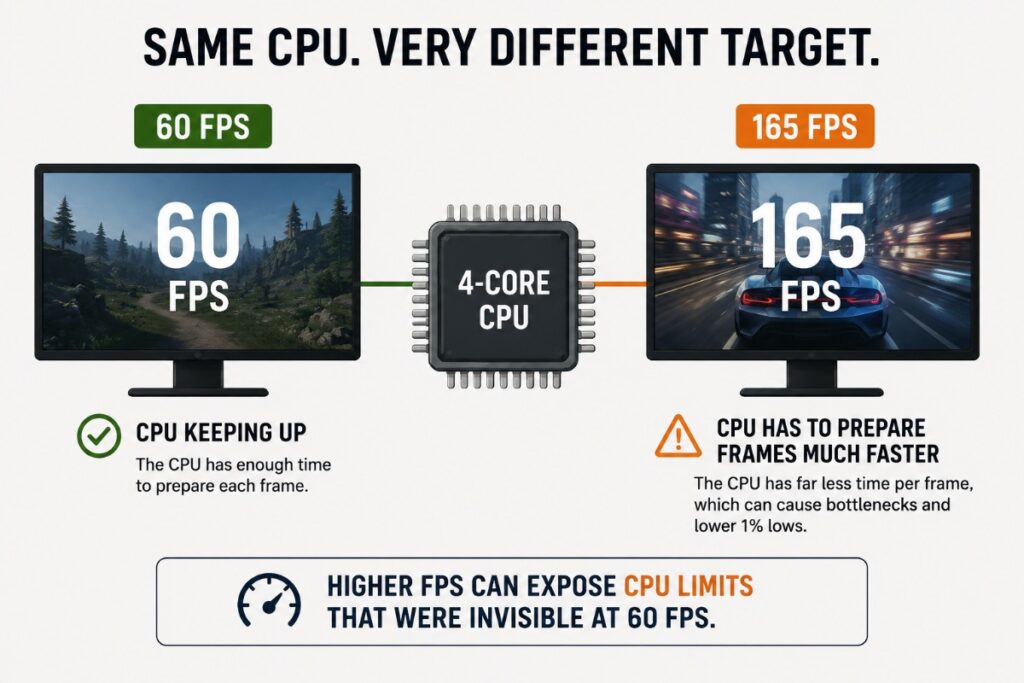
A quad-core that handles 60 FPS comfortably may become the limit when chasing 144, 165 or 240 FPS. The CPU must prepare game data fast enough to support those extra frames, so high-refresh gaming can expose a processor that seemed perfectly adequate at 60 FPS.
Powerful GPUs at Lower Resolutions
A faster graphics card can expose a CPU bottleneck that a slower GPU previously hid. This is especially noticeable at 1080p, where a powerful GPU may render frames quickly enough for the CPU to become the next performance ceiling.
This does not mean 1080p automatically causes a CPU bottleneck. It simply makes CPU limitations easier to expose when the GPU has plenty of performance available.
Background Applications
Discord, browsers, launchers, recording software and other background tasks also compete for CPU time. That matters more when a quad-core is already close to its limit, particularly on older 4C/4T processors with little spare thread capacity.
4 Cores vs 6 Cores for Gaming: What Actually Changes?
Moving from four cores to six gives the CPU more physical resources to handle game threads and other work, but six cores do not automatically make a processor faster for gaming.
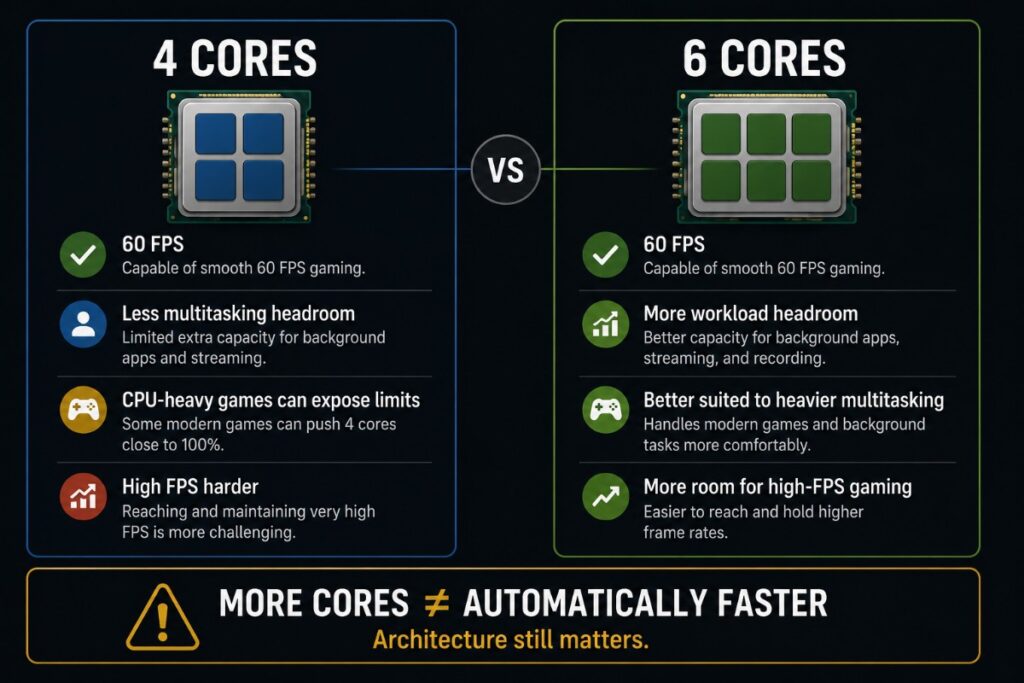
A modern six-core CPU will often provide substantially more headroom than an older quad-core, but part of that advantage may come from faster individual cores, better cache, higher clocks and a newer architecture rather than those two additional cores alone.
| Gaming Situation | 4 Cores | 6 Cores |
|---|---|---|
| 60 FPS gaming | Can still be enough | More headroom |
| GPU-limited gaming | Difference may be small | Difference may still be small |
| CPU-heavy games | Greater risk of limitation | Generally more headroom |
| 144+ FPS gaming | Limitations become easier to expose | Usually better suited |
| Background applications | Less spare capacity | More spare capacity |
| New gaming PC | Difficult to justify deliberately | Much more sensible starting point |
The biggest improvement may not always appear in average FPS. Extra CPU headroom can become more noticeable during demanding moments when an older quad-core is already close to its limit.
That can mean stronger 1% lows, fewer severe frametime spikes and more capacity for background applications. But the benefit depends on the game and the processors being compared.
So do not upgrade from a four-core CPU to a six-core CPU simply because six is a bigger number. The replacement CPU needs to be meaningfully faster in the workloads that are currently causing your problem.
Why Your Average FPS Can Look Fine While Games Still Stutter
This is where judging an older CPU by average FPS can become misleading. Your benchmark might report an average of 75 FPS, which sounds perfectly playable. But that number does not tell you whether the game delivered those frames consistently.

If CPU-heavy moments repeatedly cause performance to fall into the 35 to 45 FPS range before recovering, the overall average can still look respectable while the game feels jerky.
This is why 1% lows and frametimes matter.
Average FPS tells you roughly how many frames were produced over the test. A 1% low helps reveal what happened during the slower parts of that run. Frametime shows how long individual frames took to arrive.
For example, two PCs could both average 75 FPS. One might deliver those frames relatively consistently, while the other repeatedly suffers large frametime spikes. On paper they have the same average. In your hands they can feel completely different.
A CPU running close to its limits is one possible cause of those spikes, but it is not the only cause. Shader compilation, insufficient RAM, storage activity, drivers, background processes and other problems can also produce stutter.
If your game still stutters even after lowering the graphics settings, our guide to why games stutter on low settings covers the other common causes before you blame the processor.
The important point is that your quad-core does not need to produce terrible average FPS to be holding back the experience. Poor frame consistency can be the warning sign that matters more.
How to Tell If Your 4-Core CPU Is Actually Holding You Back
This is the part that matters before you spend any money. Do not upgrade because somebody says four cores are obsolete. Test the PC you actually own and find out what is limiting the games you actually play.
Check GPU Utilization
Start by watching what the graphics card is doing during the part of the game where performance becomes poor.

If the GPU is consistently working near its normal full load, it is probably doing as much rendering work as it can. A faster CPU may not dramatically change performance if the graphics card is already the main limitation.
If GPU utilization falls well below what you would expect while FPS refuses to increase, the CPU becomes one possible suspect. But low GPU usage alone does not prove a CPU bottleneck. Frame caps, V-Sync, game-engine limits and other problems can also reduce GPU utilization.
If you want to diagnose that relationship properly, use our full guide to finding what is actually bottlenecking your gaming PC before replacing hardware.
Look at Individual CPU Threads, Not Just Total CPU Usage
Seeing 100% CPU usage while gaming is an obvious warning sign, but the opposite can be misleading. A game can become limited by one or several heavily loaded CPU threads even when total processor utilization is below 100%. That is why simply opening Task Manager, seeing 70% CPU usage and declaring the processor fine is not enough.
Likewise, seeing 100% utilization does not automatically mean the CPU needs replacing. Background processes, unusual game behaviour or software problems may be contributing. If your processor is regularly pinned during gaming, our guide to what 100% CPU usage while gaming actually means will help you separate normal load from a problem worth fixing.
Check 1% Lows and Frametime
Now look beyond the average FPS counter.
If the average remains acceptable but 1% lows collapse or the frametime graph shows repeated spikes during CPU-heavy moments, you have stronger evidence that something is interfering with consistent frame delivery.
Run the same section of the same game more than once. Randomly comparing two different areas tells you very little.
If you are not comfortable collecting this information yet, our safe gaming PC performance testing guide explains how to test FPS, temperatures and hardware behaviour without turning benchmarking into guesswork.
Lower the Resolution and Test Again
Lower the resolution substantially and repeat the same test. If FPS rises significantly, the GPU was likely an important limitation. If FPS barely changes, investigate the CPU or another system bottleneck more closely.
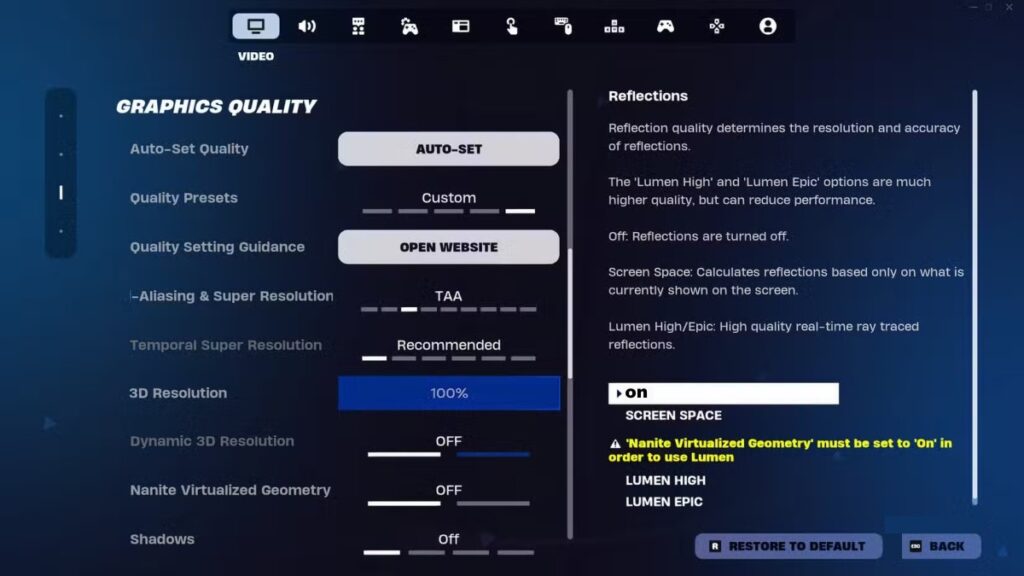
It is not a perfect test, but combined with GPU usage, CPU thread load and frametimes, it provides much better evidence than core count alone.
Close Background Applications and Retest
Close unnecessary browser tabs, launchers, recording software and other background apps, then retest. If performance improves noticeably, limited CPU headroom may be contributing, especially on older 4C/4T processors.
Cap Your FPS and Compare the Experience
If FPS fluctuates heavily, try a lower cap the PC can maintain consistently. If the game becomes noticeably smoother, your quad-core may still be perfectly usable at a more realistic performance target.
| Test | What Happens | What It Suggests |
|---|---|---|
| Lower resolution | FPS rises substantially | GPU was likely an important limit |
| Lower resolution | FPS barely changes | Investigate CPU or another system limit |
| Close background apps | Stutter improves | CPU or thread contention may be contributing |
| Apply a sustainable FPS cap | Frametime becomes more consistent | Previous FPS target may have exceeded stable system performance |
| GPU remains heavily loaded | Performance remains GPU-bound | CPU upgrade may provide limited benefit |
| GPU load drops while important CPU threads saturate | FPS stops scaling | CPU limitation becomes more likely |
No single row in that table proves you need a new processor. What you are looking for is a pattern of evidence. If several tests keep pointing back to the CPU across the games you actually care about, then you finally have a good reason to consider upgrading.
Can You Make a 4-Core Gaming PC Last Longer?
Yes. If testing shows the CPU is struggling but still close to delivering the performance you need, a few sensible changes can extend its useful life.
Reduce CPU-Heavy Game Settings
Settings such as crowd density, simulation detail, NPC density, physics and sometimes view distance can increase CPU workload. Reducing these may help a CPU-limited game more than lowering textures or resolution.
Check Temperatures and Clock Speeds
Make sure the CPU is actually performing as intended. Thermal throttling, poor cooling or abnormal clock behaviour can make an older processor perform worse than it should.

Our guide to monitoring temperatures, clocks and hardware usage will help you check its behaviour under load.
Use a Realistic FPS Target
If your quad-core cannot maintain very high FPS consistently, a sensible frame cap can reduce CPU pressure and improve frame pacing. Our guide to why capping FPS can make games feel smoother explains how to choose a useful limit.
Do Not Buy the Wrong Fix
A faster SSD will not fix a CPU bottleneck, and adding RAM beyond what the game needs will not create more CPU performance. A faster GPU can even expose the CPU limit more clearly.
This is why diagnosis comes before shopping. Some PC upgrades sound useful but barely improve gaming when they do not address the actual bottleneck. If these changes still cannot deliver the performance you need, an upgrade becomes much easier to justify.
When You Should Actually Upgrade
At this point, the decision should have very little to do with the number four. If your games run smoothly at the performance you want, the GPU remains the main limitation and your frametimes are consistent, keep the CPU. A newer processor being faster does not automatically make your current processor inadequate.

An upgrade becomes much easier to justify when testing repeatedly shows that the CPU is preventing the rest of the PC from delivering the gaming experience you want.
Signs Your 4-Core CPU Really Is Ready for Replacement
Start taking an upgrade seriously if several of these problems appear across the games you actually play:
- CPU-heavy games repeatedly suffer poor 1% lows or severe frametime spikes.
- Your GPU cannot remain properly utilized because the CPU cannot feed it quickly enough.
- You cannot maintain the high FPS target your monitor and GPU are capable of supporting.
- Background applications noticeably worsen gaming performance because there is very little CPU headroom left.
- Your old 4C/4T processor regularly reaches its limits in modern games.
- A stronger GPU has exposed a CPU bottleneck that your previous graphics card hid.
- Several different games show the same CPU-limited behaviour during controlled testing.
One poorly optimized game is not enough evidence on its own. Neither is seeing 100% CPU usage once.
What matters is a repeatable pattern showing that the processor cannot meet your actual performance target.
| What Your Testing Shows | What You Should Do |
|---|---|
| Games are smooth at your desired FPS | Keep the CPU |
| GPU remains the main performance limit | Keep the CPU for now |
| Only one game struggles | Diagnose that game before upgrading |
| Multiple CPU-heavy games have poor 1% lows | CPU upgrade becomes easier to justify |
| High-refresh target is repeatedly CPU-limited | CPU upgrade may provide meaningful value |
| Old 4C/4T CPU is holding back a much faster GPU | Strong case for upgrading |
| CPU upgrade requires a new motherboard and possibly RAM | Compare the cost of replacing the platform |
If the evidence says the CPU really is next, our guide to upgrading a gaming PC in the right order can help you avoid replacing another component first and ending up with the same bottleneck.
Sometimes the Platform Is the Bigger Problem
There is another complication with older quad-core systems: replacing the CPU may not be a simple CPU swap. An old motherboard socket may have no worthwhile upgrade available. Moving to a genuinely faster processor could also require a new motherboard and, depending on the platform, different RAM.
At that point you are no longer deciding whether to spend a little money on a CPU. You are considering a platform replacement. That changes the economics considerably.
If you are facing a motherboard, CPU and memory purchase just to keep an ageing system alive, use our guide to deciding whether to upgrade an old PC or replace it before committing to the parts. The cheapest upgrade is not always the one with the lowest purchase price. It is the one that gives you enough useful performance to justify what you spent.
Should You Buy a 4-Core CPU for a New Gaming PC in 2026?
This is where the answer changes.
Keeping a 4-core CPU you already own is very different from deliberately buying one for a new gaming PC in 2026.
If an existing quad-core already runs your games properly, replacing it can be unnecessary. But when you are buying from scratch, there is little reason to build in limited CPU headroom unless the price and intended use make it genuinely worthwhile.
A new gaming PC needs to cope not only with today’s game but also with future games, background applications, operating-system tasks and potentially a faster graphics card later.

For most new gaming builds, a capable modern six-core processor is a much more sensible starting point than deliberately targeting four cores. That is not because six is a magic number. It is because the CPUs available in that class generally give a new gaming system substantially more room to grow.
There can still be exceptions. An extremely cheap secondary PC, a machine intended almost entirely for lightweight games or an unusually good-value part may make a quad-core defensible. But it should be a deliberate budget decision, not the default choice for a new gaming build.
If you have reached the point where replacing the processor genuinely makes sense, this is where our gaming CPUs actually worth buying in 2026 guide becomes useful. Choose the replacement based on the performance and value you need, not simply the number of cores printed on the box.
Frequently Asked Questions
Are 4-core CPUs still enough for gaming in 2026?
Yes, some 4-core CPUs are still enough for gaming in 2026. Their suitability depends on the processor itself, the games you play, your GPU, target FPS and background workload. Older 4C/4T processors are much easier to overwhelm than stronger 4C/8T designs, but core count alone cannot determine gaming performance.
Is 4 cores and 8 threads enough for gaming?
A 4-core, 8-thread CPU can still provide a good gaming experience in the right system, particularly with a modest GPU and sensible FPS target. Eight threads can provide more scheduling headroom than a 4C/4T design, but they do not turn four physical cores into eight cores.
Is 4 cores enough for 60 FPS gaming?
It can be. If your CPU can consistently prepare frames fast enough to maintain 60 FPS in the games you play, with good 1% lows and stable frametimes, having only four cores is not automatically a reason to upgrade.
Is 4 cores enough for 144Hz or 165Hz gaming?
It depends on the CPU and game, but high-refresh gaming makes CPU limitations easier to expose. Maintaining 144 FPS or more requires the processor to prepare frames much faster than a 60 FPS target, so older quad-core CPUs can struggle even when the GPU has performance left.
Is 6 cores better than 4 cores for gaming?
Six cores generally provide more processing headroom, especially for CPU-heavy games, high-FPS gaming and background workloads. But a six-core CPU is not automatically faster than every four-core CPU. Architecture, cache, clock speed and per-core performance still matter.
Does 100% CPU usage mean I need a new CPU?
No. High CPU utilization tells you that the processor is busy, not why it is busy. Check individual thread load, GPU utilization, background applications, frametimes and repeatable game performance before deciding the CPU needs replacing.
Can a 4-core CPU cause stuttering?
Yes, a 4-core CPU can contribute to stuttering if it lacks enough performance or thread headroom for the workload. However, stuttering can also come from shader compilation, RAM limitations, storage activity, drivers and other problems, so the core count alone does not prove the cause.
Should I upgrade my 4-core CPU or my GPU first?
Upgrade whichever component is actually preventing you from reaching your performance target. If the GPU is already working at its limit, replacing the CPU may achieve little. If testing shows the CPU repeatedly preventing a capable GPU from being fully utilized, the processor becomes a much stronger upgrade candidate.
Final Verdict
Are 4-core CPUs still enough for gaming in 2026? Yes, some absolutely are.
A quad-core paired with a modest GPU can still make perfect sense for older games, lightweight titles and 60 FPS gaming. Stronger 4C/8T processors can also remain surprisingly capable when expectations match what the hardware can deliver.
But the limits are becoming easier to expose. CPU-heavy modern games, powerful GPUs, high-refresh gaming and heavy background workloads leave an older quad-core with much less room to breathe. A 4C/4T processor that was once perfectly adequate may now struggle with frame consistency even when its average FPS does not look disastrous.
That still does not mean you should replace it because somebody decided four cores are obsolete.
Watch your GPU utilization. Check individual CPU threads. Look at 1% lows and frametimes. Reduce the GPU workload and retest. Close unnecessary background applications. Try a sustainable FPS cap.
Then make the decision from evidence.
Don’t upgrade because your CPU has four cores. Upgrade when your CPU can no longer deliver the gaming experience you actually need.