Updated 1st September 2026: We rechecked the specifications, battery claims and current model positioning for all eight mice. Prices and stock change regularly, so confirm the live offer before buying. The star scores shown below are BuiltToFrag editorial ratings based on features, suitability, limitations and current value, not Amazon customer ratings. Affiliate disclosure: As an Amazon Associate, BuiltToFrag earns from qualifying purchases. This does not affect the price you pay or how we select our recommendations.
The best gaming mouse for most mixed-game players is the Razer Basilisk V3 Pro 35K, provided you like a larger, heavier right-handed mouse. Competitive FPS players should choose something lighter, such as the Razer DeathAdder V4 Pro or the discounted Logitech G Pro X Superlight. MMO players will get far more value from the Razer Naga V2 Pro or Corsair Scimitar Elite Wireless SE.
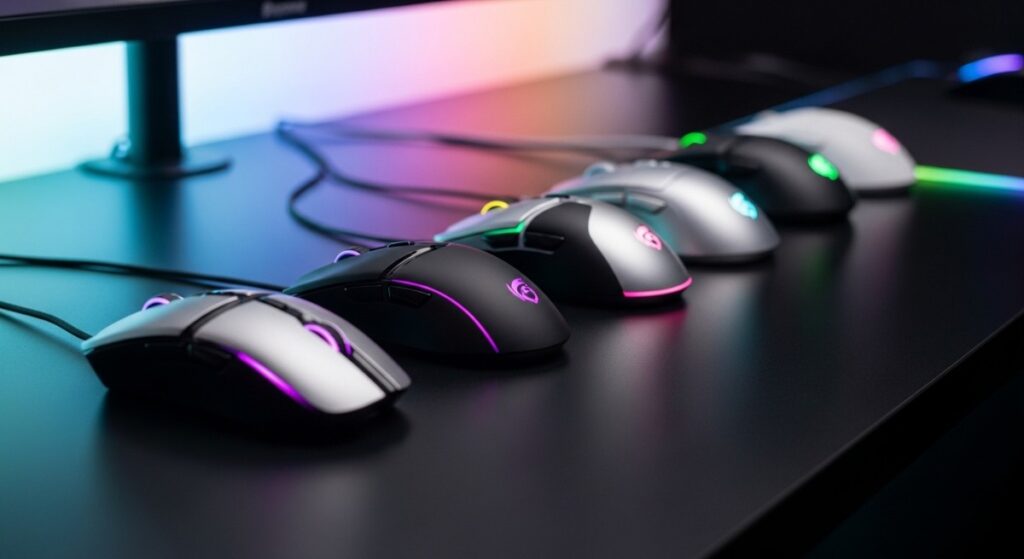
There is no mouse that is best for every hand and every game. Shape, weight and button layout matter more than whether the box says 25K, 35K or 45K DPI. This guide separates eight sensible choices by the player they suit, the advantage you are actually paying for and the limitation you should know before ordering.
Quick Answer: Which Gaming Mouse Should You Buy?
| Mouse | Best for | Weight | Biggest catch |
|---|---|---|---|
| Razer Basilisk V3 Pro 35K | Best all-rounder | 112g | Too heavy for many competitive FPS players |
| Redragon M686 | Budget wireless with extra buttons | About 124g | Heavy and less refined than premium choices |
| Razer Naga V2 Pro | MMO and multi-genre versatility | 134g | Expensive overkill if you will not use the side plates |
| Logitech G502 X Plus | Features, RGB and everyday gaming | 106g | RGB cuts battery life sharply |
| Corsair M75 Wireless RGB | Left- or right-handed wireless use | 89g | Not an ultralight FPS mouse |
| Razer DeathAdder V4 Pro | Premium competitive FPS | About 56–57g | Expensive; 8K polling reduces battery life |
| Corsair Scimitar Elite Wireless SE | Dedicated MMO button control | 114g | The button grid and software require setup |
| Logitech G Pro X Superlight | Discounted lightweight FPS value | Under 63g | Older Micro-USB model with a newer successor |
Our Gaming Mouse Picks by Player Type
- Mixed gaming and everyday use: The Basilisk V3 Pro or G502 X Plus gives you extra buttons, a useful scroll wheel and a comfortable right-handed shape.
- Competitive FPS: Start with the DeathAdder V4 Pro if you want current premium hardware, or the original Superlight when it is heavily discounted.
- MMO and ability-heavy games: Choose the Naga V2 Pro for swappable layouts or the Scimitar for a dedicated adjustable button grid.
- Left-handed play: The symmetrical M75 Wireless is the clearest option here because its magnetic side buttons can be configured for either hand.
- Older or weaker PC: Use any suitable mouse at 1000Hz. Do not pay extra for 8K polling unless your system already produces high, stable frame rates on a high-refresh display.
How We Chose These Gaming Mice
BuiltToFrag selected these mice using official specifications for measurable details such as weight, connectivity, sensor capability and manufacturer battery claims. We also compared independent mouse testing and recurring owner feedback to identify practical issues that a specification sheet cannot explain on its own.
This is a researched buying guide, not a claim that we personally laboratory-tested every mouse. Manufacturer battery figures are best-case claims and can change with RGB, polling rate and connection mode. Our labels describe the player each mouse makes sense for; they are not claims that one model is objectively superior for every person.
For specialist measurements such as click latency, sensor latency and motion performance, see the independent testing database at RTINGS. For the rest of your controls and PC hardware, use our gaming mice, keyboards and peripherals guide.
1. Razer Basilisk V3 Pro 35K: Best All-Round Gaming Mouse
The Razer Basilisk V3 Pro 35K is our best all-round recommendation for a right-handed player who moves between shooters, RPGs, strategy games and ordinary desktop work. Its larger ergonomic shell, tilt-capable scroll wheel and generous button layout make it more versatile than a stripped-down esports mouse.
The important trade-off is its 112g weight. That can feel reassuring in slower games and everyday use, but competitive FPS players who make rapid flicks may find it tiring or sluggish compared with a mouse under 70g. The optional 8K polling support also requires compatible Razer HyperPolling hardware, so do not treat 8K as something every buyer receives or needs.
- Best for: Medium to large right hands, palm or relaxed claw grip, mixed gaming and productivity.
- Why buy it: Excellent feature set, useful wheel and extra controls without becoming an MMO mouse.
- Skip it if: You want a light competitive FPS mouse, use your left hand, or dislike a busy button layout.
Check the current Basilisk V3 Pro 35K price and availability below.

2. Redragon M686: Best Budget Wireless Mouse With Extra Buttons
The Redragon M686 is the practical budget pick for someone who wants 2.4GHz wireless, programmable controls and a rechargeable battery without paying premium-brand prices. Its PixArt 3335 sensor and 1000Hz polling are sufficient for ordinary gaming, and its three side buttons give it more flexibility than a basic two-button FPS design.
Do not mistake cheap for lightweight. At roughly 124g, the M686 is one of the heaviest mice in this guide and is a poor match for someone specifically chasing fast, low-effort FPS flicks.
- Best for: Budget-conscious right-handed gamers, larger hands and mixed games.
- Why buy it: Low price, rechargeable wireless connection and useful extra buttons.
- Skip it if: Low weight, premium software or long battery life matters more than price.
See whether the Redragon M686 is currently available at its usual budget-friendly price.

Specs Snapshot: 16,000 DPI, 1000Hz polling, up to 45-hour battery (eco-mode),
3. Razer Naga V2 Pro: Best MMO Mouse for Different Button Layouts
The Razer Naga V2 Pro makes sense for an MMO player who also plays games that do not need a wall of thumb buttons. Its interchangeable 2-, 6- and 12-button side plates let you move from an ordinary layout to MOBA or MMO controls without owning three mice.
That flexibility carries a substantial price and weight penalty. At approximately 134g, it is the heaviest mouse in this list, and most FPS players will be better served by something simpler. Its up-to-150-hour 2.4GHz battery claim is attractive, but RGB, connection mode and use will affect the real result.
- Best for: Medium to large right hands, palm grip, MMO players who also play other genres.
- Why buy it: Three side plates make it unusually adaptable.
- Skip it if: You only need two side buttons, prefer low weight or will never change the plates.
Check the latest Naga V2 Pro price before deciding whether its extra versatility justifies the premium.

4. Logitech G502 X Plus: Best for RGB, Extra Controls and Everyday Gaming
The Logitech G502 X Plus is a strong alternative to the Basilisk for gamers who want an ergonomic right-handed shell, multiple programmable controls, a dual-mode scroll wheel and visible RGB. It suits mixed gaming better than pure esports because its features remain useful in RPGs, strategy games and daily desktop work.
The battery headline needs context. Logitech claims up to 130 hours with RGB off, but only around 37 hours with the lighting constantly on. It also weighs approximately 106g, so the G502 X Plus is not the right purchase merely because someone wants the fastest FPS mouse.
- Best for: Medium to large right hands, palm or claw grip, mixed games and RGB setups.
- Why buy it: Excellent wheel, button flexibility and a proven all-purpose shape.
- Skip it if: You want an ultralight mouse or expect maximum battery life with RGB blazing.
View the current G502 X Plus price and available colour options below.


5. Corsair M75 Wireless RGB: Best Symmetrical Wireless Mouse
The Corsair M75 Wireless is the clearest option in this group for someone who wants a symmetrical mouse that can be configured for left- or right-handed use. Its swappable magnetic side buttons let you cover or activate the controls on either side, while 2.4GHz wireless and Bluetooth make it practical for a gaming desktop and a laptop.
This is the 89g wireless model, not the lighter 74g wired M75. That distinction matters: 89g is a reasonable middle weight, but it is not ultralight by competitive FPS standards. Corsair quotes up to 105 hours over 2.4GHz and longer over Bluetooth, with lighting and use affecting the result.
- Best for: Left- or right-handed users, medium hands, claw or fingertip grip and multi-device use.
- Why buy it: Genuinely adaptable side controls and both gaming-grade wireless and Bluetooth.
- Skip it if: You specifically want a sub-70g FPS mouse or a sculpted right-handed shell.
Check the current M75 Wireless offer and confirm that it is the 89g wireless model.

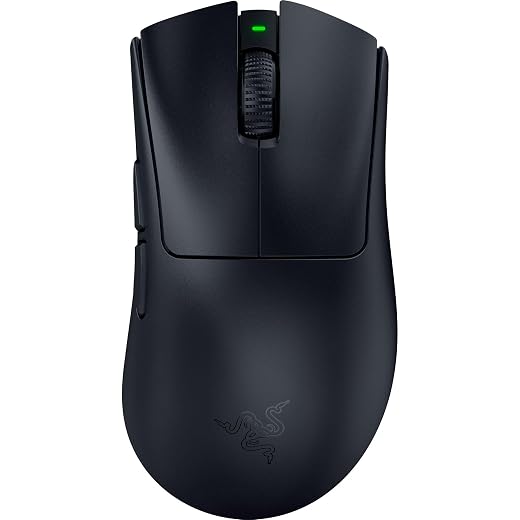
6. Razer DeathAdder V4 Pro: Best Premium Mouse for Competitive FPS
The Razer DeathAdder V4 Pro is the premium FPS choice for a right-handed player who likes the DeathAdder’s ergonomic shape but wants a modern ultralight body. At about 56–57g, it is dramatically easier to move than the Basilisk, G502, Naga or Redragon. Its Focus Pro 45K sensor and wireless 8K polling support are high-end extras, not the main reason to buy it.
The real reasons are low weight, responsive wireless performance and a familiar ergonomic shell. The catch is value. Most gamers will perform perfectly well at 1000Hz with a cheaper mouse, and Razer’s battery claim drops from up to 150 hours at 1000Hz to roughly 22 hours at 8000Hz. Older CPUs can also experience extra overhead at very high polling rates.
- Best for: Medium to large right hands, palm or claw grip and high-FPS competitive games.
- Why buy it: Premium ultralight hardware in a comfortable right-handed shape.
- Skip it if: You use a weaker PC, play at 60Hz, have a tight budget or prefer symmetrical mice.
See the latest DeathAdder V4 Pro price and availability below.
7. Corsair Scimitar Elite Wireless SE: Best Dedicated MMO Button Grid
The Corsair Scimitar Elite Wireless SE is for the player who knows they want a full MMO thumb grid. Its 12-button Key Slider panel can be moved forward or backward to bring the buttons under your thumb, which can be more useful than simply adding more controls to a fixed shell.
Unlike the Naga V2 Pro, the Scimitar does not transform into a simple two-button mouse. It remains a dedicated MMO design, and its 114g weight, dense side layout and software setup will not suit everyone. Corsair’s battery claims can vary by connection mode, RGB use and regional product information, so check the current figure on the exact retailer listing instead of treating one maximum number as guaranteed.
- Best for: Right-handed MMO, MOBA and productivity users who actively use macros.
- Why buy it: Adjustable 12-button panel and extensive command access.
- Skip it if: You mainly play FPS games or dislike configuring buttons and software.
Check the current Scimitar Elite Wireless SE offer and available retailer pricing.

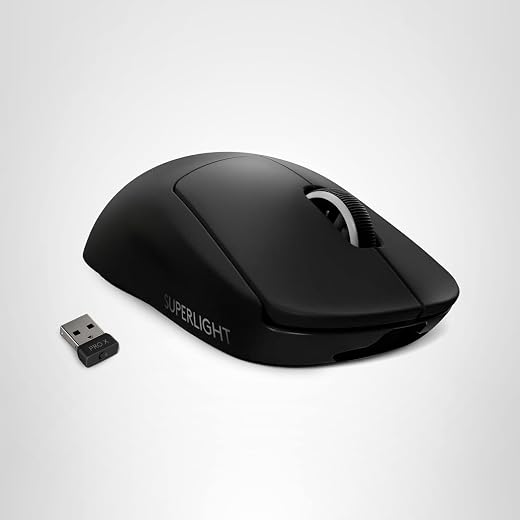
8. Logitech G Pro X Superlight: Best Discounted Lightweight FPS Mouse
The original Logitech G Pro X Superlight remains a sensible FPS mouse when its price is substantially below the Superlight 2. It weighs under 63g, uses Logitech’s HERO 25K sensor and keeps the simple symmetrical shape that made it popular with competitive players.
It is no longer Logitech’s current flagship. The original model uses Micro-USB, has older switch technology and is limited to 1000Hz, while the Superlight 2 adds USB-C, newer switches, a HERO 2 sensor and higher polling support. That does not make the original bad; it makes it a sale-price recommendation. If the two models cost nearly the same, buy the newer one.
- Best for: Medium hands, claw or fingertip grip and competitive FPS on a sensible budget.
- Why buy it: Proven low-weight shape and dependable 1000Hz wireless performance at the right price.
- Skip it if: The Superlight 2 is only slightly more expensive or Micro-USB is a deal-breaker.
Check the original Superlight’s current price and compare it with the newer Superlight 2 before buying.
How to Choose a Gaming Mouse That Fits You
Start With Your Games
FPS players usually benefit most from low weight, a safe shape and two accessible side buttons. MMO players need a button layout they can identify by touch. Mixed-game players may get more daily value from a better scroll wheel and extra controls than from shaving another 20g off the shell.
Match the Shape to Your Hand and Grip
Palm-grip players often prefer a mouse that supports more of the hand. Claw grip works with many medium ergonomic or symmetrical shapes, while fingertip players generally favour shorter, lighter shells. These are starting points, not laws. If possible, compare the dimensions with a mouse you already find comfortable.

Choose a Weight You Can Control
A sub-70g mouse can feel quick and reduce fatigue during repeated FPS movements. Around 80–95g is a flexible middle ground. Models over 100g can feel planted and feature-rich, but they demand more effort during rapid flicks. Ultralight is not automatically better if the shape makes you grip the mouse too tightly.
Do Not Buy a Mouse for Its DPI Number
Modern gaming sensors already track accurately at normal settings. Most players use somewhere around 800–1600 DPI, but DPI and in-game sensitivity work together. Choose a comfortable DPI and then adjust the game’s sensitivity until you can aim consistently. A 45K sensor will not automatically improve someone who plays at 1600 DPI.
Treat 1000Hz as the Safe Default
A 1000Hz polling rate remains the practical setting for most gamers. Higher rates can reduce input intervals slightly when paired with very high frame rates and a high-refresh monitor, but they also consume more battery and can add CPU overhead. On an older or weaker PC, use 1000Hz first and only increase it if the game remains smooth.
If your screen is still limiting what you can see, our guide to matching a gaming monitor to your PC will make a larger practical difference than chasing an extreme polling rate.
Common Gaming Mouse Buying Mistakes
- Buying the largest DPI number: Maximum DPI is easy to market but rarely determines which mouse feels or performs best.
- Assuming the highest polling rate is always better: A 4,000Hz or 8,000Hz mouse sends input more frequently, but some games and weaker CPUs may struggle to process it consistently. If you experience FPS drops when you move the mouse, test a lower polling rate before assuming the mouse is defective.
- Ignoring weight: A 124g budget mouse and a 57g FPS mouse create very different experiences even if both report at 1000Hz.
- Assuming wireless means Bluetooth: Use the supplied 2.4GHz receiver for gaming. Bluetooth is better suited to convenience and battery-saving use.
- Paying for buttons you will not bind: An MMO grid is useful only when those controls solve a real problem.
- Ignoring the newer model: An older flagship is good value only when its discount is large enough to justify the missing upgrades.
Gaming Mouse FAQ
What is the best gaming mouse for most people?
The Razer Basilisk V3 Pro 35K is the most versatile choice here for a right-handed mixed-game player who likes a larger mouse. FPS-focused players should choose the lighter DeathAdder V4 Pro or a discounted G Pro X Superlight instead.
Does 8K polling really matter?
Only in a narrow high-performance situation. It makes the most sense when a strong PC is producing very high frame rates on a high-refresh display. Even then, it is a small latency improvement rather than a dramatic aim upgrade. Use 1000Hz if 8K causes stutter or drains the battery too quickly.
Can a high polling rate reduce FPS?
Very high polling rates can increase CPU work and may contribute to stutter or lower performance on older processors or systems with heavy background load. Returning the mouse to 1000Hz is an easy diagnostic step.
What DPI should I use for gaming?
Many players are comfortable between 800 and 1600 DPI, but the correct result depends on your in-game sensitivity, available desk space and preference. Consistent control matters more than copying another player’s number.
Are ultralight mice always better?
No. Low weight can reduce fatigue and help with fast FPS movements, but a poor shape can still be uncomfortable or difficult to control. Some players prefer a heavier, more stable-feeling mouse for slower games and everyday use.
Is wireless mouse lag still a problem?
Good modern 2.4GHz gaming connections can perform close enough to wired that most players will not perceive added delay. Keep the receiver reasonably close and use the manufacturer’s gaming receiver rather than Bluetooth for competitive play.
Final Verdict: Buy for Fit, Not Marketing Numbers
Buy the Basilisk V3 Pro if you want a comfortable, feature-rich all-rounder and do not mind its weight. Choose the DeathAdder V4 Pro for premium competitive FPS, or the original Superlight when its discount makes it the smarter value. MMO players should decide whether they want the Naga’s swappable layouts or the Scimitar’s dedicated adjustable button grid.
The Redragon M686 keeps the entry price low, while the M75 Wireless is the most accommodating choice here for left- or right-handed use. The G502 X Plus suits someone who wants extra controls and RGB but understands what that lighting does to battery life.
The smartest mouse is not the model with the biggest sensor number. It is the one whose shape, weight, controls and price match the games you actually play.