Updated 15/04/2026
Doom The Dark Ages PC requirements look reasonable at first glance, until you notice the part that really matters: this game requires a hardware ray tracing-capable GPU even at minimum settings. But Can Your Rig Handle Doom Dark Ages? Well.. yes, you can technically run it with the listed minimum spec, but that does not mean it will feel good, look good, or age well on an 8GB card.
If you are trying to figure out whether your current rig is enough, the short answer is simple. 8GB VRAM is now the danger zone. It may get you into the game, but it is not the comfortable place to be for a big modern AAA release that leans this hard on GPU memory, ray tracing, and upscaling.
Quick Answer: Can You Run It?
If you do not want the long version yet, here is the blunt version. For the full breakdown straight from the source, you can check the official Doom The Dark Ages PC requirements on Bethesda’s support page.
- Minimum: Yes, if you have an RT-capable GPU with 8GB VRAM, 16GB RAM, and a supported 8-core / 16-thread CPU.
- Recommended: A 10GB or better GPU is the safer target for 1440p High at 60 FPS.
- Best real-world result: 12GB and above gives you more breathing room for textures, effects, and future patches.
- Important catch: If your GPU does not support hardware ray tracing, the game is a non-starter.
Doom The Dark Ages PC Requirements, Official Specs First
Before we get dramatic about VRAM, let’s start with what Bethesda officially says. These are not rumor specs or random Reddit guesses. These are the published targets for the PC release, and they already tell you a lot about where the pain starts.

- Minimum target: 1080p, 60 FPS, Low settings, 8GB RT-capable GPU, 16GB RAM, NVMe SSD
- Recommended target: 1440p, 60 FPS, High settings, 10GB GPU, 32GB RAM, NVMe SSD
- Ultra 4K target: 2160p, 60 FPS, Ultra settings, 16GB GPU, 32GB RAM
The most important part is not the marketing headline, it is the requirement hidden inside it. Hardware ray tracing support is mandatory. That means older non-RT cards are out, full stop. If you are still on aging hardware and wondering why newer releases feel hostile, this is exactly why. A lot of newer games are no longer built around “close enough” compatibility.
If you are planning a rebuild instead of forcing bad hardware to suffer, read How to Pick PC Parts That Actually Fit and Perform. It will save you from panic-buying the wrong stuff.
Can 8GB VRAM Run Doom The Dark Ages?
Yes, but this is where people confuse “launches” with “runs well.” Those are not the same thing anymore. An 8GB GPU may satisfy the minimum line item, but minimum specs are usually survival specs, not comfort specs.

If your target is 1080p Low and you are willing to lean on upscaling, you may get by. If your plan is 1440p, higher texture settings, or anything resembling “I paid for this GPU and want it to look decent,” then 8GB starts looking cramped very quickly. If you are tracking modern games that could hammer older rigs, our Crimson Desert PC performance article looks at another visually massive game weak PCs may struggle with.
That is really the core of this article. 8GB is no longer a comfortable amount of VRAM for a game like this. It is the floor, not the sweet spot. If you are shopping today, buying an 8GB card for a game with these requirements is just asking to revisit the problem again later.
If you are stuck with your current setup for now, your best move is smarter tuning, not wishful thinking. Start with Why Does My Game Stutter on High-End PC? and Why Capping FPS Is Better before you start blaming every dropped frame on one setting.
How Doom The Dark Ages Actually Runs on Real PCs
This is the part that matters more than the raw spec sheet. On real systems, Doom The Dark Ages is primarily a GPU pressure test. The official requirements already point that way, and real-world coverage backs it up. Ray tracing is not an optional extra here, and upscaling is often the thing that keeps weaker cards from tipping over completely.

Here is the practical reading of it:
- 1080p Low: Achievable on minimum-class RT GPUs, but this is not luxury territory.
- 1080p to 1440p with quality settings: This is where 10GB to 12GB starts making far more sense.
- 4K Ultra: The official guidance jumps all the way to 16GB, which tells you exactly how heavy the top-end preset is.
That does not mean every 8GB card instantly melts, but it does mean you are operating with less margin for textures, effects, and future updates. If your rig already struggles with newer games, this is not the title that will magically respect your budget.
Is Doom The Dark Ages CPU Heavy or GPU Heavy?
For most players, this is a GPU-first game. The official CPU requirements are not tiny, but once you meet that modern 8-core / 16-thread baseline, the graphics card becomes the bigger story. That lines up with the way Bethesda positions the game and with broader testing that shows higher resolutions hit the graphics side much harder.
So no, your CPU is probably not the first thing to panic-upgrade unless it is genuinely old. If you are on a decent Ryzen 3000-era chip or newer, or a modern Intel equivalent, your bigger concern is almost certainly the GPU and its VRAM budget.
This also means people chasing performance should not blindly copy esports logic into a cinematic AAA game. Throwing money at the processor while keeping a cramped GPU is how you stay broke and still annoyed.
DLSS vs FSR, Can Upscaling Save You?
Upscaling absolutely helps, but it is not magic. It can improve average FPS and make borderline hardware more playable, especially at 1080p. It does not erase the reality of limited VRAM, and it does not magically turn a weak setup into a comfortable high-settings machine.

In plain English:
- DLSS: Usually the cleaner visual option on supported NVIDIA cards
- FSR: A useful fallback when you need more performance flexibility
- Frame generation: Helpful in the right scenario, but not a substitute for enough real GPU headroom
If you are consistently below a smooth baseline before using frame generation, do not expect miracles. It can help the average FPS number look better, but bad base performance still tends to feel bad. That is why a stronger native setup still matters.
Best Upgrade Path If Your Rig Is Not Enough
If your system is missing the mark, the smartest path depends on what kind of old hardware you are dealing with. For this game specifically, the upgrade priority is very clear.
- First priority: A ray tracing-capable GPU with more than 8GB VRAM
- Second priority: 32GB RAM if you are targeting the recommended class of experience
- Third priority: Make sure the game is on an NVMe SSD, not a slow old drive
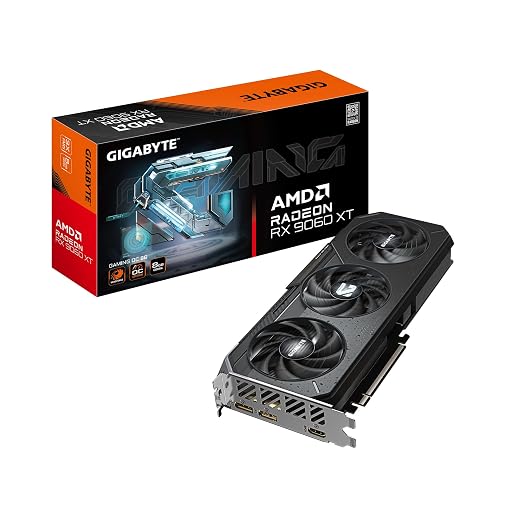
Here are some decent cards more than capable of running this game


Important legacy warning: if you are on a DDR3-era platform or using an older GPU without hardware ray tracing support, this is not a settings problem. It is a compatibility wall. Modern parts may also not drop cleanly into much older systems, so check platform limits before you start ordering parts like a man possessed.
For broader upgrade planning, use our PC parts guide. If you are not upgrading any time soon, your better move might honestly be playing something less demanding, like the games in Free Games for Garbage PCs.
FAQ: Doom The Dark Ages PC Performance and Requirements
Can 8GB VRAM run Doom The Dark Ages?
Yes, it can meet the official minimum if the GPU also supports hardware ray tracing. That said, 8GB is the floor, not the comfortable recommendation, and it is a weak place to be for long-term smoothness.
Is ray tracing required in Doom The Dark Ages?
Unfortunately Yes. Bethesda states that a hardware ray tracing-compatible GPU is required even for the minimum PC spec. This is one of the biggest compatibility filters for older systems.
What GPU do you need for 60 FPS?
Officially, Bethesda targets 1080p/60 on Low with an 8GB RT-capable GPU, 1440p/60 on High with a 10GB GPU, and 4K/60 on Ultra with 16GB. In real buying terms, aiming above 8GB is the safer move.
Is Doom The Dark Ages CPU heavy?
Not in the way many strategy games or simulation-heavy games are. Once you meet the modern CPU baseline, the GPU is more likely to be the limiting factor.
Does DLSS or FSR fix performance problems?
They help, sometimes a lot, but they do not replace real GPU headroom. Upscaling is useful. It is not a miracle cure for too little VRAM or a weak base frame rate.
Final Verdict
Can you run Doom The Dark Ages? Yes, if your rig clears the modern baseline and has a ray tracing-capable GPU. But if you are asking whether it runs well on 8GB VRAM, that answer is much less friendly.
The official spec sheet already tells the story. Minimum is 8GB. Recommended moves to 10GB. Ultra jumps to 16GB. That is not subtle. It is Bethesda politely telling you that this game is not interested in being gentle with limited VRAM.
If you already own an 8GB card, tune expectations, use upscaling carefully, and aim for sane settings. If you are buying a GPU now, do not buy for minimum. Buy for breathing room. That is the difference between “it launches” and “it actually feels worth playing.”