Updated: 28/08/2026
The right gaming PC power supply is not necessarily the one with the most watts or the shiniest efficiency badge. It is the unit that can safely support your hardware, provide the correct GPU connections, fit inside your case and leave sensible upgrade room without wasting your budget.
This power supply buying guide compares seven PSUs for budget, mainstream, high-end and compact gaming PCs. Every recommendation has a specific use case—and a reason it may be wrong for you.
If you already know your required wattage, start with the comparison below. If you are still deciding between 550W, 650W, 750W or 850W, use our gaming PC PSU wattage guide first.
Which Gaming PC Power Supply Should You Buy?
The MSI MAG A550BN is the basic choice for a low-power budget build. The be quiet! Pure Power 12 M provides a quieter, fully modular step up at 650W, while the ASRock PRO-750G adds modern ATX 3.1 and 12V-2×6 support at 750W. The Cooler Master and Super Flower units cover stronger 850W systems, while the Corsair HX1000i and SF850 serve two different specialist needs: high-end ATX builds and compact SFX PCs.
| Power supply | Best for | Wattage | Format | Modularity | Main limitation |
|---|---|---|---|---|---|
| MSI MAG A550BN | Basic budget PC | 550W | ATX | Non-modular | Limited upgrade and connector flexibility |
| be quiet! Pure Power 12 M | Modern mainstream PC | 650W | ATX | Fully modular | Uses ATX 3.0 and 12VHPWR rather than ATX 3.1 and 12V-2×6 |
| ASRock PRO-750G | Affordable modern 750W option | 750W | ATX | Non-modular | Fixed cables and only a three-year warranty |
| Cooler Master MWE Gold 850 V3 | Modern 850W value | 850W | ATX | Fully modular | Check the exact model before ordering |
| Super Flower Leadex VII XG | Premium 850W build | 850W | ATX | Fully modular | Availability and pricing can vary |
| Corsair HX1000i | Genuine high-end system | 1000W | ATX | Fully modular | Overkill for most gaming PCs |
| Corsair SF850 | Compact gaming PC | 850W | SFX | Fully modular | SFX price premium and shorter cables |
Important: the correct wattage depends on your CPU, GPU and upgrade plans. A quality 550W PSU can be a better purchase than a 1000W unit your system will never need.
Best Budget and Lower-Power PSUs
MSI MAG A550BN 550W — Best Basic Budget PSU
The MSI MAG A550BN is for a modest gaming PC that needs a credible power supply without paying for premium efficiency, modular cables or unnecessary capacity. MSI specifies 550W total output, two 6+2-pin PCIe connectors, DC-to-DC circuit design and protections including OCP, OVP, OPP, OTP and SCP.
Its non-modular cable design is less convenient, and it does not provide a native 12V-2×6 connection for newer high-power graphics cards. The five-year warranty is also shorter than those included with the more expensive recommendations.
Buy it if: you have a low-power budget GPU, conventional PCIe power connections and no plan for a demanding upgrade. Avoid it if: you expect to move to stronger hardware or need modern native GPU cabling.

be quiet! Pure Power 12 M 650W — Best Modern 650W Step-Up
The Pure Power 12 M 650W fills the gap between a basic budget PSU and the 750–850W units intended for stronger upgrade plans. It is fully modular, 80 Plus Gold certified and supports both conventional 6+2-pin PCIe connections and a native 12VHPWR cable for compatible GPUs.
This is an ATX 3.0 power supply rather than one of the newer ATX 3.1 models used elsewhere in the guide. Its 16-pin GPU connection is also the earlier 12VHPWR design rather than 12V-2×6. That does not make it unsuitable for a compatible mainstream PC, but buyers should understand the difference instead of assuming every native 16-pin cable is identical.
The 650W capacity makes sense for a mainstream gaming PC that needs better efficiency, quieter operation and cleaner cable management without jumping to 750W or 850W. Its main limitation is price: a basic low-power system may not benefit enough from the premium over the MSI MAG A550BN.
Buy it if: you want a quiet, fully modular 650W PSU with native support for compatible PCIe 5.0 graphics cards. Avoid it if: you specifically want ATX 3.1 and the revised 12V-2×6 connection, or your hardware fits comfortably on a cheaper basic PSU.

Best Mainstream and Upgrade-Ready PSUs
ASRock PRO-750G — Affordable Modern 750W Option
The ASRock PRO-750G is a practical specification-led option for gamers who want 750W, ATX 3.1 support and a native 12V-2×6 connection without paying for a premium modular power supply. This recommendation is specifically for the fixed-cable PRO-750G, not the similarly named fully modular PRO-M750G. It is PCIe 5.1 ready, 80 Plus Gold certified and uses a 120mm temperature-controlled fan. Independent evidence is more limited than it is for the strongest-tested recommendations in this guide, so we are presenting it as an affordable option rather than declaring it the best 750W PSU overall.
ASRock uses a dual-colour design on the 12V-2×6 connector to make an incomplete connection easier to spot. The plug should be inserted far enough that the contrasting section is no longer visible, although the cable must still be routed without excessive strain or a severe bend near the connector.
The main compromise is its non-modular cable design. Every cable remains attached, which can create extra clutter in smaller cases. Its three-year warranty is also considerably shorter than the ten-year coverage offered with several more expensive recommendations in this guide. That does not prove the PSU is unreliable, but it reduces its appeal as a long-term premium purchase.
Buy it if: you want an affordable 750W ATX 3.1 PSU with a native 12V-2×6 cable and do not mind fixed cables. Confirm that the retailer lists the PRO-750G, not the modular PRO-M750G. Avoid it if: you want fully modular installation, longer warranty coverage or independent laboratory evidence comparable to the strongest recommendations in this guide.

Cooler Master MWE Gold 850 V3 — Best-Value 850W Pick When Priced Right
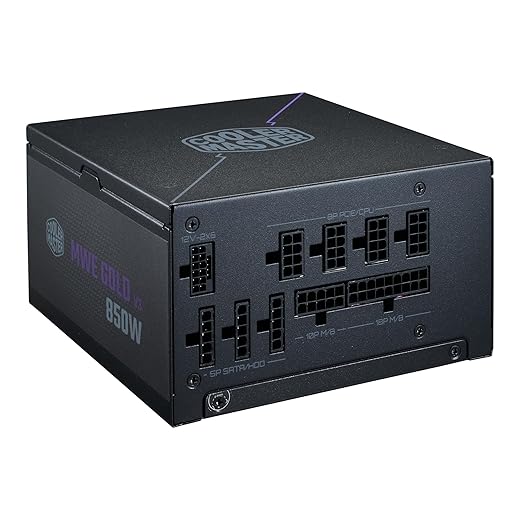
The fully modular MWE Gold 850 V3 provides ATX 3.1 support, a native 12V-2×6 cable, zero-RPM operation and a ten-year warranty. It is intended for a stronger GPU build that genuinely benefits from 850W but does not need premium Platinum efficiency or software monitoring. Its value depends on price: choose it when it is meaningfully cheaper than the Super Flower Leadex VII XG. If the two cost roughly the same, the stronger independent evidence behind the Super Flower makes that the safer overall purchase.
Cooler Master sells similarly named MWE Gold V3 variants, including fixed-cable models. This recommendation applies specifically to the fully modular MWE Gold 850 V3 ATX 3.1, listed by Cooler Master under the MPX-8503-AFAG-2 model family. Before ordering, confirm that the retailer describes the unit as fully modular and does not show an MPE-series non-modular model number.
Buy it if: the fully modular model is meaningfully cheaper than the Super Flower and you want modern 850W features at the lower price. Avoid it if: the listing is the non-modular version or its price is close to the more independently tested Super Flower.
Super Flower Leadex VII XG 850W — Best Overall 850W Choice
The Leadex VII XG 850W is the strongest all-round 850W recommendation in this guide. It supports ATX 3.1 and PCIe 5.1, includes a native 12V-2×6 cable and uses fully modular cabling. Super Flower also provides a ten-year warranty.
More importantly, Cybenetics lists the Leadex VII XG 850W with Platinum efficiency and Lambda A noise results. That independent evidence gives the recommendation more substance than a specification sheet alone.
Buy it if: you want a well-evidenced 850W PSU for a strong gaming build. Avoid it if: availability is poor or it costs substantially more than another properly tested 850W option.

Best High-End and Compact PSUs
Corsair HX1000i — Best Premium 1000W PSU
The Corsair HX1000i is for a genuinely high-end system, not an ordinary gaming PC with optimistic upgrade plans. The current model provides 1000W, ATX 3.1 and PCIe 5.1 support, a native 12V-2×6 connection, fully modular cables and Platinum-rated efficiency.
Its digital monitoring can report power information through Corsair’s iCUE software, while Cybenetics records Platinum efficiency and Lambda A noise results for the ATX 3.1 model. These are premium features, but they do not make games run faster.
Buy it if: your high-end CPU and GPU combination, sustained workloads or planned upgrade genuinely justify 1000W. Avoid it if: a quality 750W or 850W unit already covers your system comfortably.

Corsair SF850 — Best SFX PSU for Compact Gaming PCs
The Corsair SF850 is included for one reason the original guide failed to address: some compact cases require an SFX power supply. It provides 850W in the smaller SFX format while supporting ATX 3.1, PCIe 5.1 and a native 12V-2×6 GPU cable.
It is fully modular and Platinum-rated, but compact size carries trade-offs. SFX units usually cost more than comparable ATX models, and their shorter cables are designed around small cases. Do not buy one for a standard tower unless the case or build layout specifically benefits from it.
Buy it if: your compact case requires SFX and your hardware justifies substantial capacity. Avoid it if: your case accepts a normal ATX PSU or you only need a modest low-power SFX build.

How Much PSU Wattage Do You Need?
Your GPU and CPU determine most of the requirement, but the exact answer also depends on power limits, factory overclocks, additional hardware and future upgrades.
| System type | Useful starting range | Recognisable examples |
|---|---|---|
| Low-power budget build | 450–550W | Older or entry-level GPU with a modest mainstream CPU |
| Mainstream gaming build | 550–650W | Systems around an RTX 5060, RTX 5060 Ti, RTX 5070 or RX 9070, subject to the exact card and CPU |
| Upgrade-friendly build | 650–750W | Stronger mainstream hardware, including an RX 9070 XT or RTX 5070 Ti-class build |
| Upper-mainstream or high-end build | 750–850W | Higher-draw graphics cards such as an RTX 5080, especially with a powerful CPU |
| Specialist high-end system | 850–1000W+ | Flagship hardware, unusually power-hungry CPUs, overclocking or sustained CPU-and-GPU workloads |
These examples are routing aids, not universal prescriptions. NVIDIA lists 550W for many RTX 5060 systems, 650W for the RTX 5070 and 850W for the RTX 5080, while AMD lists 650W for the RX 9070 and 750W for the RX 9070 XT. Partner cards, power-hungry CPUs, overclocking and other hardware can change the requirement, so check the recommendation for your exact graphics card before buying. Our PSU wattage guide explains that decision in detail.
Check These Five Things Before Buying a PSU
1. Confirm the Exact Wattage
Do not choose wattage from the GPU name alone. The CPU, GPU model, factory power limits and upgrade plan all matter. Equally, do not buy 1000W merely because it feels safer. Unused capacity does not improve FPS or make an unsuitable PSU higher quality.
2. Check the GPU Power Connector
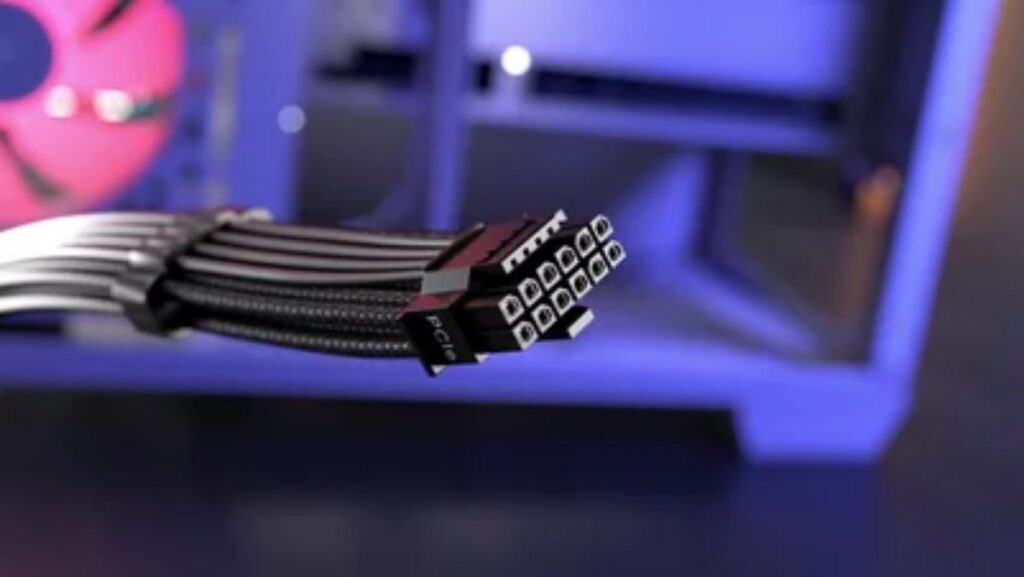
Many graphics cards still use one or more conventional 6+2-pin PCIe connectors. Newer high-power models may use a 16-pin connection, with 12V-2×6 being the current revised design. A native PSU cable can simplify installation and avoid a bulky adapter, but not every gaming PC needs one.
Seat every GPU connector fully, avoid severe bends immediately after the plug and make sure the side panel does not push against the cable.
3. Confirm the PSU Fits Your Case
Most conventional desktop cases accept ATX power supplies. Small-form-factor cases may require SFX or SFX-L. Check the required format, PSU length, cable clearance and any conflict with drive cages or a front radiator.
An SFX-to-ATX bracket can fit a small PSU into some larger cases, but that does not automatically make SFX the better choice. Standard ATX PSUs usually offer better value and more appropriate cable lengths for normal towers.
4. Treat Efficiency as Efficiency, Not Quality
Bronze, Gold, Platinum and Cybenetics efficiency ratings describe how efficiently a PSU converts incoming power under defined test conditions. Better efficiency can reduce wasted heat, but it does not independently prove excellent voltage regulation, low ripple, complete protections or long-term reliability.
Gold is a practical target for many new gaming builds, but a credible Bronze unit can still make sense in a tightly constrained budget PC. The complete model matters more than the badge.
5. Check Modularity, Warranty and Independent Testing
Fully modular cables make installation and future changes easier. Non-modular designs cost less but leave every cable permanently attached. Modularity does not improve gaming performance.
Never mix modular cables from different PSU models unless compatibility is explicitly confirmed. PSU-side wiring is not universal, even when the connector physically fits. An incompatible cable can damage your hardware.
If your PC restarts or shuts down while gaming after a PSU or cable change, switch it off and verify every cable against the PSU manufacturer’s compatibility information before testing it again.
A long warranty is valuable, but it should not replace independent evidence. Laboratory testing can reveal efficiency, noise, voltage regulation, ripple and protection behaviour that a retail specification sheet cannot establish.
How We Selected These Power Supplies
The seven recommendations were selected by buyer use case rather than wattage alone. We considered form factor, current ATX and GPU-connector support, modularity, warranty and whether each product serves a meaningfully different system.
Official manufacturer information was used to verify specifications. Where available, we also checked independent results from the Cybenetics PSU Performance Database, which evaluates efficiency and noise and publishes detailed laboratory reports.
BuiltToFrag did not perform electrical load testing on these units. Manufacturer specifications are therefore treated as specifications, while independent laboratory results are identified separately. Prices and availability can also change, so a recommendation only remains good when its current price supports its assigned role.
Common PSU Buying Mistakes
- Buying wattage instead of quality: a questionable 1000W PSU is not better than a properly evaluated 650W or 750W unit.
- Buying far more capacity than you need: unused wattage does not increase FPS, reduce bottlenecks or guarantee future compatibility.
- Ignoring the exact model: similar product names can hide different platforms, cable designs and ATX revisions.
- Forgetting case dimensions: wattage means nothing if the PSU and its cables do not fit properly.
- Treating an efficiency badge as a quality verdict: efficiency is only one part of PSU performance.
- Mixing modular cables: reuse a cable only when the PSU manufacturer confirms compatibility.
- Rejecting an older PSU based on age alone: consider its exact model, condition, warranty, connector support and suitability for the new hardware.
If you are assembling an entire system on a limited budget, our guide to common cheap gaming PC mistakes covers the other shortcuts that frequently cost builders more later.
Final PSU Buying Checklist
- Confirm the capacity required by your exact CPU and GPU combination.
- Check the GPU connectors and the number of separate cables supplied.
- Verify ATX, SFX or SFX-L case compatibility and physical dimensions.
- Read evidence for the exact model, not merely the brand or product family.
- Choose upgrade headroom deliberately rather than buying the largest PSU available.
Disclosure: Some product links may be affiliate links that help support BuiltToFrag at no additional cost to you.