Updated 27/03/2026
Buying the wrong motherboard is one of the easiest ways to waste money on a gaming PC. It won’t boost FPS, but it controls stability, upgrades, storage, and whether your build runs smoothly or turns into a problem.
This guide breaks down the best gaming motherboards for every budget and what actually matters so you can buy once and move on. For most gamers, a solid AM5 mid-range board is the sweet spot, while Intel buyers need to pay closer attention to socket compatibility. Focus on CPU match, VRMs, and expansion, everything else is just marketing noise. If you’re still planning your build, check our How to Pick PC Parts That Fit and Perform guide first.
Every Budget Quick And Dirty list: Quick Answers
If you do not want the full lesson and just want the shortlist, start here. These are the boards that make the most sense for real gaming builds right now.
- Best Overall: MSI MAG B650 Tomahawk WiFi
- Best Budget: Gigabyte B650M DS3H
- Best Mid-Range: ASUS TUF Gaming B650-PLUS
- Best High-End: Gigabyte X670E AORUS Master
- Best Intel Pick: MSI MAG Z890 Tomahawk WiFi
If you just want the safest answer for most gaming builds, get the MSI MAG B650 Tomahawk WiFi. It is the easiest recommendation here because it avoids the usual budget-board compromises without wandering into silly-money territory. If you’re trying to stretch every dollar, read our best PC upgrades under $100 guide. It pairs perfectly with budget motherboard choices.
Quick Comparison Table
This table exists for one reason: to stop you from overbuying. Most gamers do not need an expensive flagship motherboard. They need the right board for their CPU, storage plans, and budget.
| Motherboard | Chipset | Best For | Price Tier |
|---|---|---|---|
| MSI MAG B650 Tomahawk WiFi | AMD B650 | Best overall balance | Upper mid-range |
| GIGABYTE B650M D3HP | AMD B650 | Budget AM5 gaming builds | Budget |
| ASUS TUF Gaming B650-PLUS | AMD B650 | Mainstream Ryzen builds | Mid-range |
| Gigabyte X670E AORUS Master | AMD X670E | High-end and expansion-heavy builds | Premium |
| MSI MAG Z890 Tomahawk WiFi | Intel Z890 | Best current Intel gaming platform option | Upper mid-range |
How to Choose the Right Gaming Motherboard Without Wasting Money
If you are new to PC building, motherboard shopping can look way more complicated than it really is. Most of the confusion comes from brands stuffing product pages with words like “extreme,” “AI,” “military-grade,” and other nonsense designed to make a rear I/O shield sound like a life event.
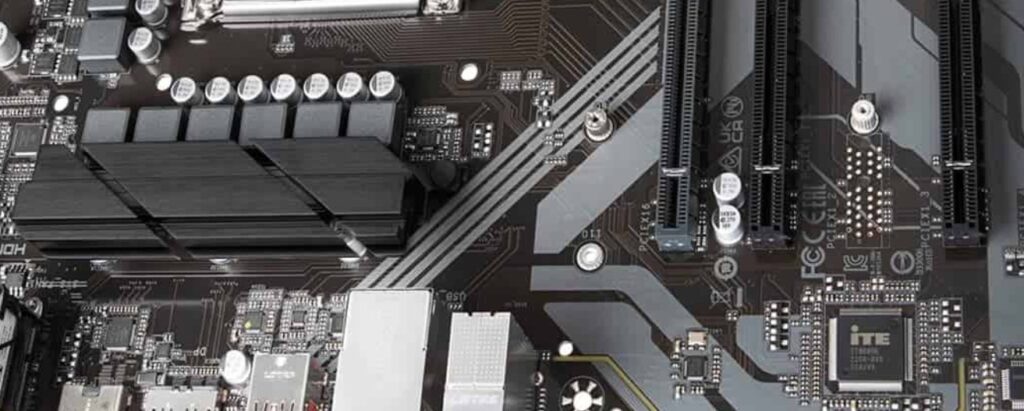
What actually matters is boring, which is exactly why it matters. You need the correct socket for your CPU, enough VRM quality to keep your processor stable under load, enough M.2 slots for your storage plans, decent rear I/O, and a layout that will not become annoying the second you add a bigger GPU or more fans. That is the real motherboard buying guide. The rest is glitter on a PCB.
Best Budget Motherboards
This is where most gamers should start, especially if the build budget is tight and the money needs to go toward the GPU first. A good budget motherboard is not the absolute cheapest thing you can find. It is the cheapest board that still gives you a stable gaming foundation, decent memory support, and enough storage and connectivity that you do not regret it six months later.
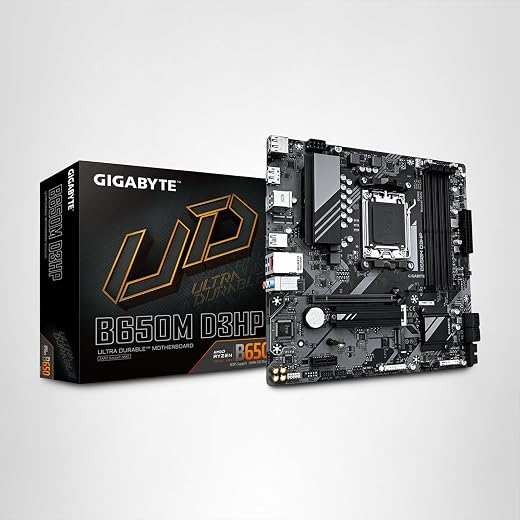
GIGABYTE B650M D3HP
The Gigabyte B650M DS3H is a smart entry-level AM5 board that gives you DDR5 support, solid power delivery, and essential features like dual M.2 and 2.5GbE without pushing you into overpriced territory. It’s ideal for Ryzen 5 builds focused on strong gaming performance per dollar, offering a stable, no-nonsense foundation that gets the job done without pretending to be a high-end overclocking platform. If you want reliable performance on a tight budget, this is one of the safest picks
Solid AM5 entry point, ideal for budget gamers who want DDR5 and Ryzen upgrade room without overspending..
ASRock B650M Pro X3D WiFi 6E
If the Gigabyte board is the obvious budget pick, the ASRock B650M Pro X3D WiFi 6E is the choice for gamers who want stronger features without jumping into premium motherboard pricing. Designed with AMD’s Ryzen X3D processors in mind, it supports Ryzen 7000, 8000 and 9000 Series CPUs, offers a solid VRM design, DDR5 memory support, integrated WiFi 6E and multiple high-speed M.2 slots for future storage upgrades.
It’s the kind of board that gives you room to grow, making it a far smarter long-term investment than buying the cheapest motherboard available and replacing it a couple of years later. And no, one SSD still won’t be enough because Steam remains gloriously greedy.
See This Well Rounded Board Below

Best Mid-Range Motherboards
This is the real battleground for the best motherboard for gaming. Mid-range boards are where value lives, and this is also where a lot of people accidentally waste money by creeping too close to premium pricing for features they will never touch. This is also where your CPU choice matters most. See our best gaming CPUs value guide to pair your motherboard correctly.
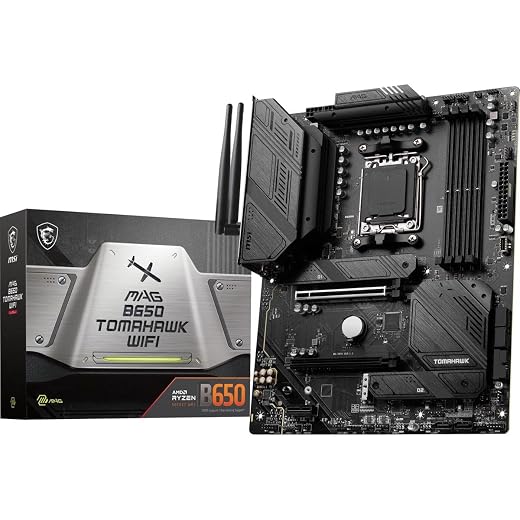
MSI MAG B650 Tomahawk WiFi
The MSI MAG B650 Tomahawk WiFi is one of the best overall AM5 motherboards because it delivers strong VRM performance, stable thermals, DDR5 support, and modern connectivity like Wi-Fi 6E and 2.5G LAN without drifting into overpriced territory.
It’s ideal for Ryzen 5 and Ryzen 7 gaming builds, especially CPUs like the 7600 or 7800X3D, giving you consistent performance, upgrade flexibility, and zero unnecessary compromises. If you want a reliable, long-term gaming foundation, this is the safest all-round pick.
ASUS TUF Gaming B650-PLUS
The ASUS TUF Gaming B650-PLUS is a solid mid-range AM5 motherboard that balances durability, stable power delivery, and practical features like DDR5 support and PCIe 5.0 storage without pushing into premium pricing. It’s ideal for gamers building a reliable Ryzen system who want room for storage upgrades and consistent performance without paying for enthusiast extras.
If you want a dependable, no-drama board that just works and lasts, this is one of the safest mid-range picks. And once your system is built, don’t overlook BIOS updates, modern firmware releases can improve hardware compatibility, stability, and overall reliability. Our guide on why keeping your BIOS up to date matters for gaming stability explains why this simple step is often overlooked.
Best value pick for mainstream gaming builds

MSI PRO B650-P WiFi
The MSI PRO B650-P WiFi deserves this spot because it is the value-minded alternative inside the mid-range tier. MSI lists Ryzen 7000, 8000, and 9000 support, DDR5, Wi-Fi 6E, and a 12+2+1 power design. That is the kind of spec sheet that gives you enough confidence to pair it with a serious gaming CPU without feeling like you bought the motherboard equivalent of a compromise apology.
Best High-End Motherboards
This is where people start paying for more lanes, more storage flexibility, heavier VRMs, and premium connectivity. It is also where people start lighting money on fire because a board has armor plating and an “extreme gaming” name. High-end motherboards make sense for certain builds, but only if your CPU, GPU, cooling, and storage plans actually justify them.
Gigabyte X870E AORUS Gaming Board
The Gigabyte X870E AORUS is a Mid-high-end AM5 motherboard built for serious gaming and expansion, offering powerful VRMs, strong thermal design, PCIe 5.0 support, and multiple M.2 slots for storage-heavy setups. It’s ideal for enthusiasts running higher-end Ryzen CPUs who want maximum stability, upgrade flexibility, and fewer platform limitations over time. If you’re building a top-tier system and plan to expand it, this board justifies its price, but for most gamers, it’s deliberate overkill.
Premium AM5 board for enthusiasts who want stronger power delivery
ASUS ROG Strix X870E Gaming
The ASUS ROG Strix X870E Gaming fits that role well. ASUS lists 18+2 power stages, DDR5 support, four M.2 slots, PCIe 5.0, and Wi-Fi 6E. That is a serious platform for users who are not just building for today, but planning around storage growth, stronger CPUs, and a cleaner high-end feature set.

Best Intel Motherboards
If you are buying Intel, pay attention here, because this is where people get burned by platform confusion. Intel’s newer desktop Core Ultra Series 2 chips use LGA1851, and Intel explicitly says they are not compatible with older LGA1700 motherboards or Intel 600 and 700 series chipsets. So no, you cannot just casually jam the shiny new CPU into your older board and call it innovation.
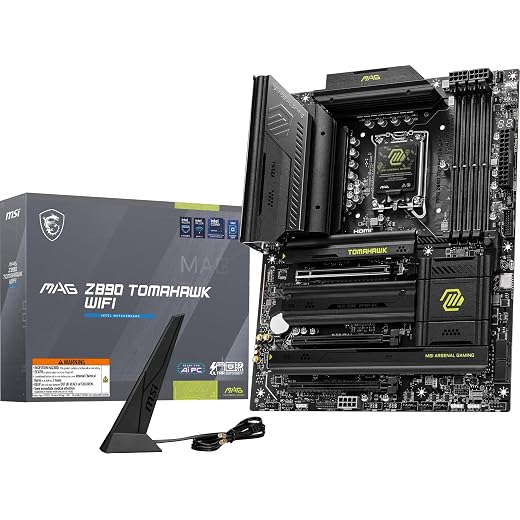
MSI MAG Z890 Tomahawk WiFi
The MSI MAG Z890 Tomahawk WiFi is one of the best current Intel gaming motherboards, built for the LGA1851 platform with strong power delivery, DDR5 support, PCIe 5.0, Wi-Fi 7, and high-speed connectivity. It’s ideal for gamers building a modern Intel system who want stability, performance, and a platform that won’t become outdated immediately. If you’re buying Intel in 2026, this is the smarter long-term choice over older Z790 boards.
Best current Intel pick for gamers who want LGA1851 support.
AMD vs Intel Motherboards
AMD vs Intel motherboards is less about brand loyalty and more about platform strategy. AMD’s AM5 platform offers a clearer upgrade path, supporting Ryzen 7000, 8000, and 9000 CPUs with BIOS updates, making it a strong choice for long-term builds.
Intel, on the other hand, requires stricter socket awareness, with current CPUs using LGA1851 and boards like Z890, while older chips remain tied to LGA1700. The key is not mixing generations, because compatibility is not optional, and chasing “deals” across platforms is how expensive mistakes happen. For full details, see Intel socket compatibility.
| Platform | Main Strength | Main Weakness | Best For |
|---|---|---|---|
| AMD AM5 | Cleaner upgrade path | DDR5-only platform cost | Most new gaming builds |
| Intel LGA1851 | Current Intel platform and strong features | Requires careful socket matching | Buyers committed to new Intel builds |
| Older Intel LGA1700 | Possible value if discounted | Not compatible with current Core Ultra desktop chips | Deal hunters on older Intel CPUs |
B650 vs X670: Which Is Better for Gaming?
This is one of the most common questions in the entire motherboard buying category, and the answer is thankfully less dramatic than the internet makes it sound. For most gaming builds, B650 is enough. It gives you access to AM5, DDR5, modern Ryzen support, and enough features that the GPU and CPU still matter way more than the chipset badge.
X670 and X670E start making sense when you want more premium power delivery, more high-speed storage options, and more overall expansion. That can matter for enthusiast builds, but it is not mandatory for gaming itself. If your main goal is frame rate and sane spending, B650 is usually the smarter buy.
| Chipset | Best For | Worth It for Most Gamers? |
|---|---|---|
| B650 | Mainstream gaming builds | Yes |
| X670 / X670E | High-end and expansion-heavy systems | Maybe |
| A620 | Very basic budget systems | No, not for most buyers |
What Actually Matters in a Gaming Motherboard
This is the part manufacturers hope you skip. Once you know what to look for, the overpriced junk becomes much easier to spot.
CPU Sockets and Chipsets
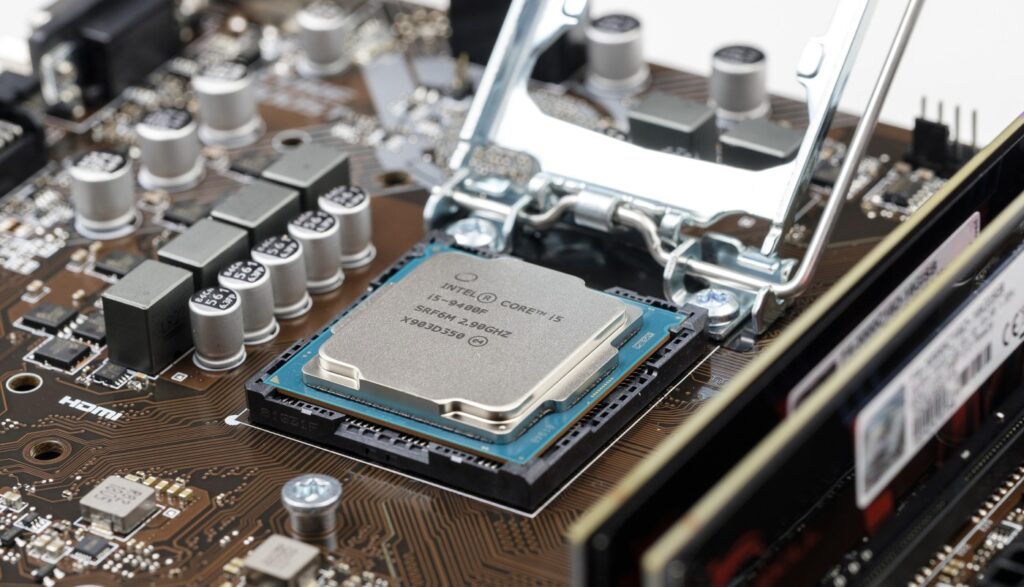
Your CPU decides your motherboard, not the other way around. AMD AM5 boards are for current AM5 Ryzen chips. Intel’s latest desktop Core Ultra platform uses LGA1851. If the socket does not match, the conversation is over. No amount of hope, branding, or forum confidence is going to change physics.
VRMs and Power Delivery
VRMs are one of the few boring motherboard topics that deserve the hype. Weak power delivery can mean higher temperatures, reduced stability, and more performance drop under sustained load. You do not need a ridiculous overclocking board for gaming, but you do want a board with cooling and power design that are not obviously built to suffer. Gamers Nexus
RAM and Storage Support
DDR5 support matters because current mainstream platforms have moved there hard. Storage layout matters because the difference between “enough M.2 slots” and “why am I already out of room” shows up faster than people expect.

Rear I/O and Connectivity
This is where practical quality lives. Front USB-C support, enough fan headers, decent rear USB, 2.5GbE, and modern Wi-Fi matter more than flashy heat spreaders and fake “gaming” labels. Buy the board you will actually use, not the one with the most dramatic product art. Wi-Fi standards explained
BIOS and Support
Good firmware support matters more than people think. A motherboard that gets BIOS updates and stays compatible with newer CPUs ages better. A board abandoned by the vendor becomes annoying faster than the spec sheet suggests. This is why update history is worth checking before you buy, not after your RAM starts acting weird.
How Motherboards Actually Affect Gaming Performance
Let’s clear this up properly. A motherboard does not directly add FPS the way a better GPU or faster CPU can. But it absolutely affects whether your CPU boosts properly, whether memory tuning works cleanly, whether storage throttles, and whether your system stays stable under load.

In other words, a motherboard is less about creating extra performance and more about not quietly strangling the performance you already paid for. If your system is already struggling, check our why your PC still feels slow after an upgrade guide.
For deeper diagnostics, use our monitor temps, clocks and usage guide to spot bottlenecks properly.
VRMs matter because if the board cannot feed the CPU properly and stay cool, clocks can drop or stability can get messy in longer gaming sessions. Memory support matters because Ryzen in particular benefits from sane DDR5 support and easy profile tuning.
Before You Upgrade: Check Your Current System
If you’re upgrading from older hardware, compatibility matters more than anything else. DDR3-era systems are not getting a simple motherboard upgrade, they require a full platform rebuild since modern AM5 and current Intel boards use DDR5 and newer sockets like LGA1851.
The same applies when comparing AM4 vs AM5 or older Intel platforms, mixing generations rarely works and usually wastes money. If your system is still decent, a targeted used-part upgrade can often make more sense than forcing a modern platform where it doesn’t fit.

Marketing Traps That Waste Your Money
Motherboard marketing is one of the funniest parts of PC hardware because the more useless the feature, the more dramatic the branding tends to get. RGB armor does not improve gaming performance. “Gaming-grade audio” usually means the same codec wearing nicer clothes. “AI tuning” often translates to “the board guessed some settings so you can feel futuristic.” If you want a broader breakdown of what actually matters, read our real-world gaming hardware guide.
The real buying priorities are still the same: CPU compatibility, decent VRMs, enough storage, sane connectivity, and firmware support that does not die immediately. Spend on those and you are building smart. Spend extra because the box looks angry and now you are just funding a marketing department’s self-esteem.
Final Verdict: Which Motherboard Should You Buy?
Here’s the simple version if you just want the right pick without overthinking it. Match your budget and build, then move on.
The best gaming motherboard is the one that fits your CPU, gives you what you need, and doesn’t waste your money on features you’ll never use.
- Best Overall: MSI MAG B650 Tomahawk WiFi, the safest choice for most gaming builds with strong performance and upgrade flexibility
- Best Budget: Gigabyte B650M DS3H, the cheapest sensible AM5 entry point that still delivers solid gaming performance
- Best Mid-Range: ASUS TUF Gaming B650-PLUS, a reliable mainstream option with good features and no unnecessary extras
- Best High-End: Gigabyte X670E AORUS Master or ASUS ROG Strix X670E-E Gaming WiFi, ideal for enthusiast builds that need expansion and long-term headroom
- Best Intel Pick: MSI MAG Z890 Tomahawk WiFi, the best choice for modern Intel builds on the current platform
FAQ
This FAQ section is here to mop up the exact questions people ask before they hit the buy button. That matters for readers, and yes, it matters for search too.
What motherboard do I need for gaming?
You need a motherboard that matches your CPU socket, supports your RAM type, has decent VRMs, and gives you enough storage and connectivity for your build. Most gamers do not need a flagship board. A good B650 or current equivalent mainstream board is enough for a lot of gaming PCs.
Does motherboard affect FPS?
Not directly in the way a GPU or CPU does. A motherboard affects stability, power delivery, memory support, and expansion. A bad board can limit performance or cause problems, but a premium board does not magically turn average parts into high-FPS miracles.
Is an expensive motherboard worth it?
Only if your build actually needs the extra features, stronger VRMs, or added storage and expansion. For most gaming builds, a strong mid-range board is the better value. Expensive boards make more sense for high-end CPUs, heavier storage setups, or enthusiasts who know exactly why they are paying more.
B650 vs X670, which is better?
X670 is better on paper for expansion and premium features, but B650 is usually the better value for gaming. If you are building a mainstream gaming system, B650 is usually enough. If you are going high-end and want more storage or platform headroom, X670 can be worth it.