The best games for AMD Radeon integrated graphics range from lightweight esports and indie games to selected modern blockbusters. However, the Radeon name alone tells you almost nothing about what your PC can run. A Radeon 610M and a Radeon 890M are both integrated graphics, but their gaming capabilities are worlds apart.
This guide will help you identify the Radeon integrated graphics inside your Ryzen PC, place them in a practical performance class and find games that suit the hardware you actually have. Each recommendation includes a realistic starting point rather than assuming that every Ryzen laptop will produce the same result.
BuiltToFrag has not personally tested every game on every AMD iGPU listed here. Recommendations are based on official hardware information, credible published testing, current game availability and whether the settings required still leave the game reasonably enjoyable. Where a performance example comes from another test system, it is treated as evidence for a starting point, not a guarantee for every laptop or desktop.
Which Games Can AMD Radeon Integrated Graphics Run?
Entry-level AMD integrated graphics such as the Radeon 610M are best suited to lightweight competitive games, indie games, older 3D releases and titles designed to scale down gracefully. Older Vega 6, Vega 7 and Vega 8 systems open the door to a broader selection of esports games and older AAA releases, particularly when paired with dual-channel memory.
Modern Radeon 680M, 760M and 780M graphics are considerably stronger. They can handle lightweight games comfortably at 1080p and make selected demanding games playable at reduced settings or resolution. The newer Radeon 880M and 890M extend those possibilities further, although neither should be treated like an unrestricted dedicated gaming GPU.
The Radeon 860M needs more careful treatment. Despite its newer name, it does not automatically outperform every Radeon 760M or 780M system. Its gaming performance can overlap those models depending on the laptop’s memory, power limits and cooling.
| Practical class | Representative iGPUs | Best suited to | Starting expectation |
|---|---|---|---|
| Lightweight gaming | Radeon 610M, older Vega 3–5 | Esports, 2D games, indies and older 3D titles | Start at 720p or 1080p Low, depending on the game |
| Older mainstream | Vega 6, Vega 7, Vega 8 | Broader esports, indies and selected older AAA games | 720p Low to 1080p Low |
| Modern entry | Radeon 660M, Radeon 740M | Esports, older AAA games and lighter modern releases | Start at 720p or 1080p Low |
| Modern performance | Radeon 680M, 760M, 780M, 860M | Strong lightweight gaming and selected demanding games | 1080p Low or Medium, with reduced resolution when needed |
| Modern upper tier | Radeon 880M, Radeon 890M | A broader range of modern games with sensible compromises | 1080p with game-specific settings or upscaling |
These are practical routing classes, not an exact ranking of every laptop and processor. They help you choose where to begin, but adjacent classes can overlap. A well-cooled Radeon 780M laptop with fast memory may outperform a poorly configured newer system, while desktop APUs can sustain more power than thin laptops using similarly named graphics.
Once you know your class, you can consider the games assigned to it and every class below it. Stronger hardware does not need a separate version of a lightweight game; it simply provides more room for higher resolution, better image quality and steadier frame rates.
Find Your Exact Ryzen Processor and Radeon iGPU
Check Task Manager
Press Ctrl + Shift + Esc to open Task Manager. Select Performance, then check both the CPU and GPU pages. The CPU page should show the complete Ryzen processor name, while the GPU page may identify a specific model such as Radeon 780M.
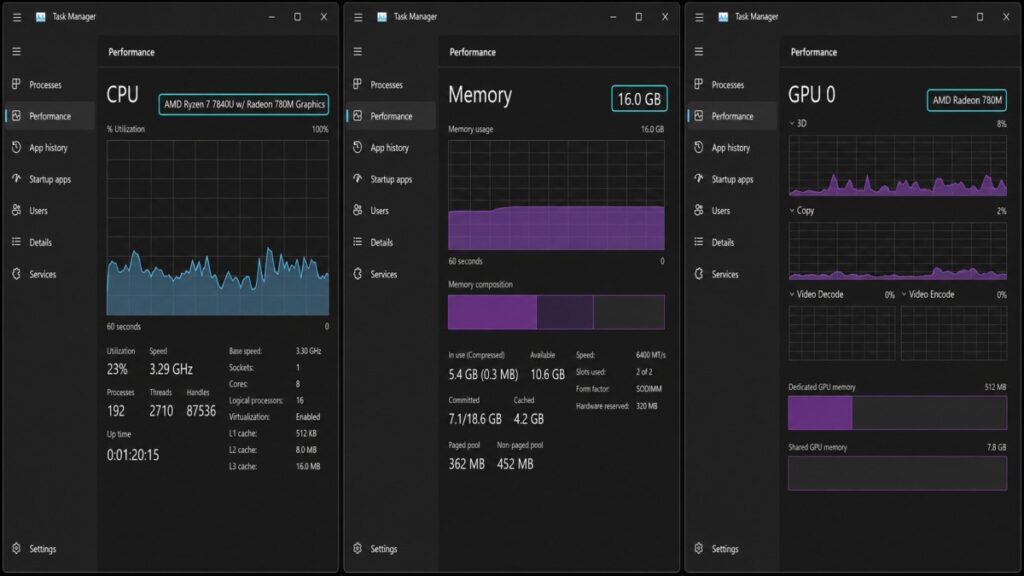
Also check whether the computer has a separate Nvidia or AMD graphics card. Many gaming laptops use integrated Radeon graphics for light workloads and switch to a dedicated GPU for games. If both appear in Task Manager, confirm which GPU the game is using before deciding that the integrated graphics are responsible for poor performance.
What If It Only Says “AMD Radeon Graphics”?
Some Ryzen processors expose only the generic name “AMD Radeon Graphics.” In that case, record the exact processor model and look it up in AMD’s official processor specifications. Do not guess from the Ryzen generation or assume that every Ryzen 7 has stronger integrated graphics than every Ryzen 5.
For example, AMD lists the Ryzen 5 7520U with a two-core Radeon 610M, while the Ryzen 7 7840U contains a 12-core Radeon 780M. Those processor names may appear relatively close to an inexperienced buyer, but their graphics capabilities are not. AMD also identifies the desktop Ryzen 5 8600G with Radeon 760M graphics and the Ryzen AI 9 HX 370 with Radeon 890M graphics.
Do not compare graphics-core counts blindly across different Radeon generations. Architecture, clock speed, memory bandwidth and available processor power also affect performance. The exact processor model remains the safest way to identify what the computer contains.
Check Your RAM Configuration Too
Task Manager’s Memory page shows installed capacity, speed and the number of occupied slots on many systems. For a more complete reading, CPU-Z or HWiNFO can help identify whether upgradeable memory is operating in single- or dual-channel mode.
This matters because an iGPU does not have the same dedicated video memory as a normal graphics card. It shares system memory with the CPU, so both memory bandwidth and available capacity can affect gaming performance. A laptop with only 8GB of RAM may also leave considerably less than 8GB available to the game after Windows and the iGPU take their share.
Do not buy additional memory merely because Task Manager shows one occupied slot. Some laptops use soldered memory, combine soldered and replaceable RAM or report their configuration in ways that are easy to misunderstand. Confirm the laptop’s upgrade options before spending money.
If Task Manager reveals Intel rather than AMD graphics, use our Intel HD Graphics Gaming Guide instead. Intel HD, Intel UHD and AMD Radeon iGPUs require different expectations.
AMD Radeon Integrated Graphics Classes Explained
The table below provides a more exact route from the graphics name or processor you found to the practical classes used throughout this guide. These classes deliberately avoid pretending that every computer with the same Radeon name performs identically.
| Graphics name | Processor example | Practical class | What to remember |
|---|---|---|---|
| Radeon 610M | Ryzen 5 7520U | Lightweight gaming | Newer Ryzen branding does not make this a powerful gaming iGPU |
| Generic Radeon, 7 graphics cores | Ryzen 5 7530U | Older mainstream | Use the processor model to identify generic Radeon graphics |
| Generic Radeon, 8 graphics cores | Ryzen 7 5700G | Older mainstream | A desktop APU may outperform a thin laptop with similar Vega graphics |
| Radeon 660M | Ryzen 5 6600U | Modern entry | Do not copy Radeon 680M or 780M settings directly |
| Radeon 740M | Ryzen 5 7540U | Modern entry | Newer architecture does not compensate for its smaller graphics configuration in every game |
| Radeon 680M | Ryzen 7 6800U | Modern performance | Laptop power, cooling and memory still affect the result |
| Radeon 760M | Ryzen 5 8640U or Ryzen 5 8600G | Modern performance | Desktop 8600G results should not be copied directly to a thin laptop |
| Radeon 780M | Ryzen 7 7840U | Modern performance | Performance can vary noticeably between different 780M systems |
| Radeon 860M | Ryzen AI 7 350 | Modern performance | Its newer name does not guarantee that it will outperform every 760M or 780M system |
| Radeon 880M | Ryzen AI 9 365 | Modern upper tier | Fast memory and adequate laptop power remain important |
| Radeon 890M | Ryzen AI 9 HX 370 | Modern upper tier | Stronger integrated graphics still require game-specific settings |
The Radeon 660M and 740M occupy the space between older Vega graphics and stronger modern iGPUs. They can run more than the weakest class, but they should not automatically inherit settings intended for the 680M, 760M or 780M.
The Radeon 860M creates a different naming problem. It is newer than the Radeon 780M but uses a smaller graphics configuration than the Radeon 880M and 890M. Depending on the system, its gaming results may overlap the 760M or 780M rather than exceed them. That is why it belongs in the modern performance class instead of being treated as an automatic upper-tier upgrade.
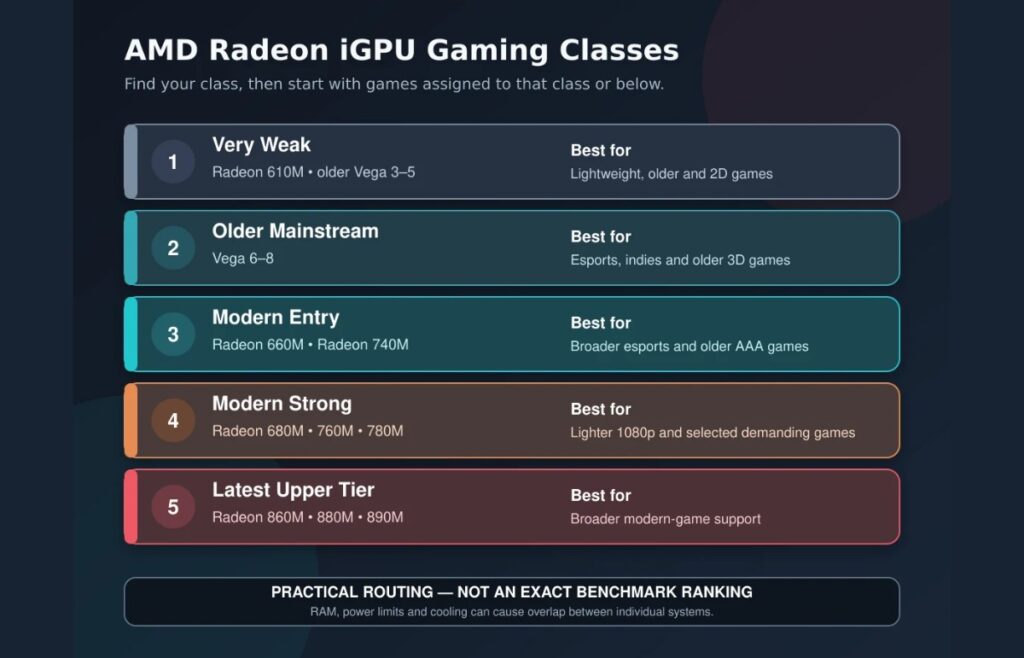
Use these classes as a safe place to begin, not as a promise of identical performance. The game recommendations below explain the starting settings and important limitations for each group.
How We Selected These Games
The best game for an integrated GPU is not merely one that launches. It should remain enjoyable at settings the hardware can realistically sustain. We therefore prioritised games that are still readily available, offer worthwhile gameplay and do not require extreme visual compromises on the Radeon class receiving the recommendation.
Some recommendations are supported by published testing on the named Radeon iGPU. Others are cautious practical recommendations based on the game’s official requirements, its visual demands and evidence from comparable or weaker hardware. We identify exact performance figures only when the cited test provides them instead of converting a reasonable recommendation into a false benchmark guarantee.
- Runs well: The game should provide comfortable performance at sensible settings for that class.
- Playable: The game can provide an enjoyable result, although settings or resolution may need adjustment.
- Playable with compromises: The game approaches the practical limit of the class and may require low settings, reduced resolution or acceptance of occasional drops.
- Not recommended: The game regularly falls below a useful frame rate, stutters severely or requires image-quality sacrifices that undermine the experience.
A stable result near 30 FPS can be acceptable in a slower single-player game. It is a poor target for a fast competitive game, where responsiveness and clear motion matter more. Average FPS also does not prove that every area will run smoothly, so use the suggested settings as a starting point and test a demanding part of the game before increasing visual quality.
Best Games for Radeon 610M and Other Entry-Level AMD iGPUs
The Radeon 610M is best served by lightweight competitive games, 2D releases and carefully selected older 3D games. The recommendations below also suit older Vega 3–5 graphics. Radeon Vega 6–8 and all stronger modern Radeon iGPUs can run these games with more room for higher resolution, visual quality or steadier frame rates.
League of Legends
Best for: Free competitive strategy
Suitable class: Radeon 610M and above
Start with: 1080p using reduced settings
Expected experience: Runs well

League of Legends is one of the safest competitive choices for entry-level AMD integrated graphics. It provides years of multiplayer depth without demanding the graphics performance of a modern shooter, and its visual settings leave enough room to prioritise responsiveness over effects.
Published Radeon 610M testing from LaptopMedia identifies League of Legends as one of the lightweight games suited to this iGPU. Begin at 1080p with reduced effects and shadows, then test a large team fight. If those battles cause noticeable drops, lower effects and character quality before reducing the resolution.
Rocket League
Best for: Free, fast online matches
Suitable class: Radeon 610M and above
Start with: 1080p Performance or Low settings
Expected experience: Runs well with appropriate settings
Rocket League combines simple controls with a high competitive ceiling, making it a much better long-term recommendation than a game included only because it appears in a benchmark suite. Its clean visual design scales well, although fast movement makes a stable frame rate more important than attractive effects.
The same Radeon 610M game testing lists Rocket League among the appropriate lightweight choices. Start with the Performance-oriented preset. If 1080p feels unresponsive during crowded matches, try 1600×900 or 1280×720 rather than accepting repeated drops.
If you enjoy Rocket League’s fast car control but want conventional racing rather than car football, explore our guide to the best racing games for low-end PCs. It separates the recommendations by hardware level, including options for very weak integrated graphics.
Stardew Valley
Best for: Relaxed farming, exploration and long-term progression
Suitable class: Radeon 610M and above
Start with: 1080p at the default settings
Expected experience: Runs well
Stardew Valley is an easy recommendation for a weak Ryzen laptop because it provides a complete, long-lasting game without placing meaningful pressure on modern Radeon integrated graphics. Its appeal comes from farming, relationships, exploration and gradual progression rather than demanding 3D presentation.
The official Stardew Valley requirements list only a 2GHz processor, 2GB of RAM and graphics with 256MB of video memory and Shader Model 3.0 support. Those specifications are far below the capabilities of a correctly functioning Radeon 610M system. Heavy mod collections can increase memory and processor demands, so establish that the unmodified game runs properly before adding them.
Terraria
Best for: Exploration, crafting, building and boss fights
Suitable class: Radeon 610M and above
Start with: 1080p at the default settings
Expected experience: Runs well
Terraria is one of the strongest low-end PC recommendations because its modest presentation hides an enormous amount of exploration, equipment progression, construction and combat. It works well for readers who want something more mechanically involved than a simple lightweight time-killer.
The official Terraria requirements ask for only a 2GHz processor, 2.5GB of RAM and a graphics processor with 128MB of video memory. Radeon 610M exceeds that graphics requirement comfortably. Extremely large worlds, busy multiplayer servers and extensive mod packs can still place additional pressure on the CPU and memory.
Portal 2
Best for: Puzzle-solving, comedy and cooperative play
Suitable class: Radeon 610M and above
Start with: 1080p Low or Medium
Expected experience: Runs well
Portal 2 remains one of the best ways to get a polished 3D experience from weak hardware. Its puzzle chambers, memorable writing and separate cooperative campaign provide more lasting value than its age suggests, while Valve’s Source engine is considerably lighter than most modern 3D engines.
Begin at 1080p with restrained antialiasing and effects. If the game struggles in larger chambers, lower antialiasing first rather than immediately reducing the resolution. Community-made maps can be more demanding than the original campaign and should not be used as the first test of the hardware.
Grand Theft Auto V Legacy
Best for: An open-world action game on entry-level graphics
Suitable class: Radeon 610M and above, with system-specific expectations
Start with: 1080p Normal, reducing resolution if necessary
Expected experience: Playable
These expectations apply to GTA V Legacy, not GTA V Enhanced. The Enhanced PC version has substantially different requirements and must not inherit performance results recorded with the older Legacy version.

GTA V Legacy earns its place because it offers a full open world on hardware that cannot comfortably run most newer games in the genre. LaptopMedia recorded approximately 44 FPS at 1920×1080 Normal in its documented Radeon 610M test. That is evidence that the game can be playable, not a promise that every 610M laptop will maintain the same result.
Begin with Normal settings and test driving through a dense part of the city. Lower grass quality, population density and advanced distance scaling if performance falls heavily in busy areas. An 8GB laptop may also struggle more once Windows and the iGPU have taken their share of system memory.
Best Games for Vega 6, Vega 7 and Vega 8
Vega 6–8 owners can play every game in the Radeon 610M section and usually have more room for higher settings or resolution. The games below expand the selection with faster competitive play and more demanding 3D releases. Results from a 65W desktop Ryzen APU may still exceed those from a thin laptop using similarly named Vega graphics.
Dota 2
Best for: Free competitive strategy with long-term depth
Suitable class: Vega 6–8 and above
Start with: 1080p Low, reducing effects if team fights drop heavily
Expected experience: Playable to runs well, depending on the system
Dota 2 should not be restricted to Radeon 680M-class graphics. Its official minimum requirements name much older Radeon HD 2600/3600-class graphics, although meeting a minimum requirement does not guarantee the stable frame rate competitive play deserves.
Vega 6–8 owners should start at 1080p Low and test a full team fight rather than relying on the quiet opening minutes. Reduce shadows and effects if battles produce large drops. Radeon 680M and stronger systems have more headroom for a moderate preset and steadier performance, but they are not the minimum sensible class for the game.
Hades
Best for: Fast single-player combat and repeated short runs
Suitable class: Vega 6–8 and above
Start with: 1080p at the default settings
Expected experience: Runs well on a properly configured system
Hades is a better everyday recommendation than another old benchmark showcase. Its responsive combat, strong progression and short repeatable runs make it suitable for both brief sessions and a long campaign, while its stylised presentation avoids the heavy graphics load of a modern 3D action game.
The official Hades requirements list a dual-core processor, 4GB of RAM and DirectX 10 graphics with 1GB of video memory. Because an iGPU uses shared rather than dedicated memory, that VRAM figure should not be interpreted literally as a requirement for a separate graphics card. Radeon 610M owners may also be able to run the game, but Vega 6–8 is the safer broad recommendation for comfortable 1080p play.
Tomb Raider (2013)
Best for: A cinematic action-adventure on older hardware
Suitable class: Vega 6–8 and above
Start with: 1080p Low or 1600×900 Normal
Expected experience: Playable
Tomb Raider is a more sensible recommendation for older Vega hardware than Shadow of the Tomb Raider, which pushes much closer to the class’s practical limit. The 2013 game still provides a polished campaign, exploration and set-piece action without demanding the same level of graphics performance as its later sequel.
Start with hair simulation disabled and keep shadows, ambient occlusion and antialiasing conservative. Test an outdoor combat area before raising visual quality. Radeon 610M may also launch the game at reduced settings, but Vega 6–8 provides a safer starting point for an experience that still looks and feels worthwhile.
Far Cry 5
Best for: Open-world shooting near the upper limit of older Vega graphics
Suitable class: Vega 6–8 and above
Start with: 1280×720 Low
Expected experience: Playable with compromises
Far Cry 5 is the demanding option in this class, not an easy recommendation. It earns a place for readers who want to test how far a stronger Vega system can go, but anyone unwilling to accept 720p and reduced visual quality should choose one of the lighter games above.
Controlled Ryzen desktop APU testing from Tom’s Hardware shows that Far Cry 5 can run on Vega-based APUs while also demonstrating why 1080p is unsafe as a broad recommendation for weaker configurations. Begin at 720p Low and test an outdoor area containing vegetation, vehicles and combat. Thin Vega laptops should not be expected to reproduce the performance of a well-powered desktop APU.
Best Games for Radeon 680M, 760M, 780M and 860M
Radeon 680M, 760M, 780M and 860M graphics can run every game recommended in the lower classes, usually with more room for 1080p, better image quality and steadier frame rates. The games below expand the selection into current competitive titles and more demanding 3D releases.
Radeon 660M and 740M owners can also consider some of these games, but should begin below the suggested settings. The Radeon 860M belongs in this broader performance group because its newer name does not guarantee that it will outperform every well-configured 760M or 780M system.
Fortnite
Best for: Free battle royale and regularly changing multiplayer content
Recommended class: Radeon 680M, 760M, 780M or 860M
Start with: 1080p Performance Mode or Low settings
Expected experience: Runs well with appropriate settings
Fortnite is one of the most obvious games Radeon iGPU owners want to play, but its changing maps, effects and rendering modes make old benchmark numbers unreliable as permanent guarantees. Epic’s current minimum specifications include Radeon Vega 8 graphics and 8GB of RAM, confirming that the game is designed to extend below the strongest modern iGPUs.
For Radeon 680M-class hardware, begin with Fortnite Performance Mode if stable competitive play matters more than visual quality. Test a busy match rather than an empty starting area. Vega 8, Radeon 660M and 740M owners can also attempt the game, but should be prepared to use 720p or a reduced 3D resolution when current seasons become demanding.
Overwatch 2
Best for: Free team-based shooting with distinct heroes
Recommended class: Radeon 680M, 760M, 780M or 860M
Start with: 1080p Low
Expected experience: Runs well on a properly configured system
Overwatch 2 is a stronger practical recommendation than an obscure benchmark title because it provides fast multiplayer action while retaining settings intended for modest PCs. Blizzard’s published minimum target included older Radeon HD 7000-series graphics, although minimum requirements represent basic operation rather than the stable frame rate expected in competitive play.
Start at 1080p Low and keep dynamic reflections, shadows and effects conservative. Test a full team battle containing several abilities rather than judging performance in the practice range. Radeon 660M and 740M may also run the game at reduced resolution, but the stronger modern class is a safer broad recommendation for responsive 1080p play.
Counter-Strike 2
Best for: Competitive tactical shooting
Recommended class: Radeon 780M, 860M, 880M or 890M
Start with: 1080p Low or Medium, prioritising stable frame delivery
Expected experience: Runs well on a suitably configured 780M-class system
Counter-Strike 2 is substantially more demanding than CS:GO, so old CS:GO benchmarks should never be used as evidence for the current game. However, it was unnecessarily restrictive to treat the Radeon 890M as the first sensible class. Notebookcheck recorded more than 60 FPS at 1920×1080 Medium on its tested Radeon 780M configuration.
That average does not guarantee competitive-grade frame-time consistency on every 780M laptop. Begin at Low if you value responsiveness, disable expensive antialiasing and test a populated match with smoke and combat. The 880M and 890M provide more headroom, while 680M, 760M and 860M systems should start more conservatively and judge the result by stability rather than the highest FPS shown in a quiet area.
The Witcher 3
Best for: A large story-driven open-world RPG
Recommended class: Radeon 680M, 760M, 780M or 860M
Start with: 1600×900 or 1080p Low using DirectX 11
Expected experience: Playable
The Witcher 3 demonstrates how much stronger modern Radeon iGPUs are than older Vega graphics. However, the original published Radeon 680M testing predates the game’s next-generation update. Its reported 1080p Medium result therefore applies to the older game version and must not be presented as a guaranteed result for the updated DirectX 12 version.

For the updated game, use DirectX 11, disable HairWorks and ray tracing, and begin at 1600×900 or 1080p Low. Test Novigrad or another demanding settlement instead of judging the whole game from an empty countryside scene. Radeon 880M and 890M owners can increase image quality after establishing stable performance, but should still leave ray tracing disabled.
Demanding Games for Stronger AMD Radeon iGPUs
The games below push integrated graphics much harder. They are most appropriate for well-configured Radeon 780M, 880M and 890M systems, although published testing shows that the Radeon 680M and some 860M systems can also produce playable results in selected games. Treat these as demanding options rather than evidence that a strong iGPU can replace a dedicated graphics card in every modern release.
Baldur’s Gate 3
Best for: Story-rich role-playing and turn-based combat
Recommended class: Radeon 680M, 780M, 860M, 880M or 890M
Start with: 1080p Low on a strong 680M/780M system, or 720p Low on a restricted laptop
Expected experience: Playable with compromises
Baldur’s Gate 3 does not need to begin at the Radeon 860M. Notebookcheck’s game testing found that the Radeon 680M was capable of running the game at 1920×1080 using the Lowest preset. Separate published results place a Radeon 780M at approximately 40 FPS at 1080p Low and about 32 FPS at Medium under the documented test conditions.

The game’s slower turn-based combat makes a stable result near 30 FPS more tolerable than it would be in a competitive shooter. However, the city in Act 3 can place substantially more pressure on the processor and memory than early areas. Begin at Low, avoid relying on frame generation to disguise a poor base frame rate and reduce resolution if the controls or camera movement feel unstable.
Cyberpunk 2077
Best for: Testing the practical AAA limit of a strong Radeon iGPU
Recommended class: Radeon 780M, 880M or 890M
Start with: 1080p Low without ray tracing, reducing resolution or using upscaling if required
Expected experience: Playable with compromises
Cyberpunk 2077 is not an easy integrated-graphics recommendation, but it demonstrates what a well-configured Radeon 780M can attempt. Notebookcheck recorded approximately 45 FPS at 1920×1080 Low without FSR on its tested Ryzen 7 7840HS mini PC. Medium fell to approximately 36 FPS.
That mini PC is a favourable test system and should not define expectations for every thin Radeon 780M laptop. Disable ray tracing, begin at Low and test driving through a dense part of Night City. Radeon 880M and 890M systems have more headroom, while Radeon 680M, 760M and 860M owners should expect to rely more heavily on reduced resolution or upscaling.
Gears 5
Best for: A polished third-person shooter with a useful built-in benchmark
Recommended class: Radeon 780M, 880M or 890M
Start with: 1080p Low or Medium
Expected experience: Playable to runs well, depending on the system
Gears 5 earns its place because it remains visually impressive, scales unusually well and includes a built-in benchmark that makes settings easier to compare. Documented Radeon 890M laptop testing supports a credible Medium-setting experience under a fast LPDDR5X memory configuration.
Radeon 880M should start at 1080p Low before attempting Medium, while Radeon 780M results will depend more heavily on power and memory configuration. Run the built-in benchmark, then verify the result in a busy campaign battle. Do not assume that another modern AAA game will run equally well merely because Gears 5 does.
AMD Radeon Integrated Graphics Games Compared
The table below shows the lowest class receiving a practical recommendation in this guide. Stronger Radeon iGPUs can also play every game listed for the classes below them, usually with better settings or more stable performance.
| Game | Genre and cost | Lowest recommended class | Starting settings | Expected experience |
|---|---|---|---|---|
| League of Legends | Competitive strategy, free | Radeon 610M | 1080p reduced settings | Runs well |
| Rocket League | Sports/action, free | Radeon 610M | 1080p Performance or Low | Runs well |
| Stardew Valley | Farming/life simulation, paid | Radeon 610M | 1080p default settings | Runs well |
| Terraria | Crafting/action, paid | Radeon 610M | 1080p default settings | Runs well |
| Portal 2 | Puzzle adventure, paid | Radeon 610M | 1080p Low or Medium | Runs well |
| GTA V Legacy | Open-world action, paid | Radeon 610M | 1080p Normal; reduce resolution if needed | Playable |
| Dota 2 | Competitive strategy, free | Vega 6–8 | 1080p Low | Playable to runs well |
| Hades | Action roguelike, paid | Vega 6–8 | 1080p default settings | Runs well |
| Tomb Raider (2013) | Action adventure, paid | Vega 6–8 | 1080p Low or 900p Normal | Playable |
| Far Cry 5 | Open-world shooter, paid | Vega 6–8 | 720p Low | Playable with compromises |
| Fortnite | Battle royale, free | Vega 8 or modern entry | Performance Mode; reduce resolution if needed | Playable to runs well |
| Overwatch 2 | Team shooter, free | Modern performance | 1080p Low | Runs well |
| Counter-Strike 2 | Tactical shooter, free | Radeon 780M | 1080p Low or Medium | Runs well on the tested class |
| The Witcher 3 | Open-world RPG, paid | Modern performance | 900p or 1080p Low, DirectX 11 | Playable |
| Baldur’s Gate 3 | Turn-based RPG, paid | Radeon 680M | 1080p Low or 720p Low on restricted systems | Playable with compromises |
| Cyberpunk 2077 | Open-world RPG/shooter, paid | Radeon 780M | 1080p Low; use upscaling if needed | Playable with compromises |
| Gears 5 | Third-person shooter, paid | Radeon 780M | 1080p Low | Playable |
Why Your AMD iGPU May Perform Worse Than the Results
Two computers with the same Radeon graphics name can produce noticeably different gaming results. The iGPU shares memory, power and cooling capacity with the processor, so its performance depends on more than the Radeon model alone.
If your game performs much worse than the starting point in this guide, check the memory configuration, available RAM, laptop power mode, temperature and rendering resolution before deciding that the recommendation is wrong or that the computer needs an upgrade.
Single-Channel RAM Can Restrict the iGPU
Integrated graphics use system memory instead of separate high-speed video memory. When upgradeable RAM operates through only one memory channel, the iGPU may not receive data quickly enough to sustain its expected performance.
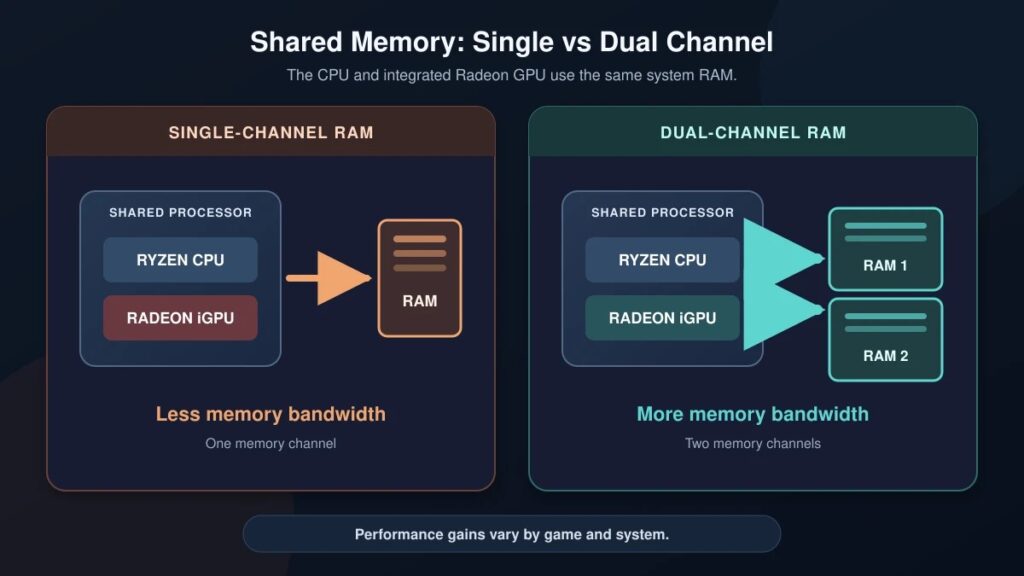
Controlled Tom’s Hardware testing demonstrated how significant this can become. In parts of its Ryzen APU test suite, a properly configured Ryzen 3 5300G could outperform a more expensive Ryzen 7 5700G restricted by single-channel memory. That does not establish one universal performance difference, but it proves that the processor name alone cannot predict the gaming result.
Read Single vs Dual Channel RAM for Gaming to check whether the current memory configuration is restricting your iGPU. Do not buy another module until you have confirmed whether the laptop uses replaceable, soldered or mixed memory and what upgrade configurations it supports.
8GB Versus 16GB of RAM Also Matters
Memory channels affect bandwidth, but total capacity determines how much RAM remains available to Windows and the game. An 8GB PC does not give the game the full 8GB because Windows, background applications and the integrated graphics all use part of that memory.
Lightweight games such as League of Legends, Stardew Valley and Terraria can still run well on an 8GB system. More demanding games such as GTA V Legacy, Fortnite, Baldur’s Gate 3 and Cyberpunk 2077 have less room to work and may stutter, load assets slowly or close background applications when memory becomes tight.
Sixteen gigabytes is therefore a safer target for the demanding half of this guide, especially when the iGPU shares a substantial portion of system memory. It is not a reason to upgrade automatically: first use Task Manager to check whether memory usage is actually approaching the limit while the game is running.
Laptop Power and Cooling Change the Result
Two laptops with Radeon 780M graphics can perform differently because each manufacturer controls processor power limits, cooling capacity and memory configuration. A slim laptop designed for silence and battery life may sustain lower performance than a well-cooled mini PC, desktop APU or thicker performance laptop.
Test games while the laptop is plugged in and use the manufacturer’s normal performance profile. If performance begins acceptably and then falls after several minutes, heat or a restrictive sustained-power limit may be involved. Lowering settings can reduce the load, but it cannot turn an aggressively power-limited laptop into the fastest example of that iGPU.
Avoid immediately selecting an extreme, turbo or overclocked profile. Establish repeatable everyday performance first, then decide whether a louder performance mode provides a worthwhile improvement.
Check Native Resolution, Upscaling and Frame Generation
A game displayed at 1920×1080 may be rendering internally at 1280×720 or another lower resolution before being upscaled. Upscaling can make a demanding game playable, but it is not the same as native 1080p and may reduce fine detail or produce shimmering around moving objects.
This is why two videos both labelled “1080p Low” may show very different performance. One may be native 1080p, while the other uses a Performance upscaling mode with a much lower internal resolution. Check the resolution scale and upscaling setting before copying the result.

Frame generation can raise the displayed FPS number without correcting a low underlying frame rate. If the game already feels delayed, unstable or unpleasant before frame generation is enabled, generated frames may improve apparent smoothness without making controls properly responsive. It is most useful after the base game already runs reasonably well.
Drivers and Game Updates Can Change Performance
Game patches, new rendering features and driver changes can alter performance after a benchmark was published. Live games such as Fortnite, Counter-Strike 2 and Overwatch 2 are particularly difficult to reduce to one permanent FPS claim because their maps, effects and rendering code continue to change.
AMD’s official driver support page provides current Radeon and Ryzen drivers. However, laptop and all-in-one manufacturers may supply customised drivers for system-specific features. Use a current compatible driver, but do not assume that replacing a stable manufacturer driver with a generic package will automatically improve performance.
If performance remains far below expectations after checking settings, memory and power mode, use Why PC Games Run Badly to investigate background CPU usage, storage problems, thermal throttling and other causes instead of continuing to reduce graphics blindly.
When Lower Settings Will Not Solve the Problem
Lower graphics settings help when the GPU workload is the main limitation. They cannot fix every bottleneck. If the computer has too little available RAM, lowering texture quality may help without eliminating memory pressure. If one memory module is restricting bandwidth, reducing effects cannot provide the missing second memory channel. If the laptop is overheating or power-limited, performance may still fall during a long gaming session.
Some games are also simply beyond the practical capability of a weak iGPU. A Radeon 610M cannot be turned into Radeon 780M performance by allocating more “VRAM” in the BIOS, installing optimiser software or applying a collection of registry tweaks. Increasing reserved graphics memory does not create additional processing power or memory bandwidth.
When a game remains unplayable at its lowest sensible settings, choosing a lighter game is often the best zero-cost solution. Cloud gaming may be another option if the service is available in your region and your internet connection provides sufficiently low latency, but it should not be mistaken for improved local graphics performance.
If you confirm that memory capacity or configuration is the problem and the computer supports an upgrade, use our RAM Buying Guide for Gaming PCs to choose compatible memory. If the desired games remain beyond the iGPU after diagnosis, read What to Upgrade First on a Low-End PC before spending money.
Choose Games for the Radeon iGPU You Actually Have
Radeon 610M and older entry-level Vega systems are best served by lightweight competitive games, indies and scalable older releases. Vega 6–8 expands the selection to more 3D games, particularly when paired with sufficient dual-channel memory. Radeon 680M, 760M, 780M and 860M make credible 1080p gaming possible across a much broader range of titles, while Radeon 880M and 890M provide more room for demanding modern games.
Even the strongest Radeon iGPU still needs realistic game-specific settings. Identify the processor, check the memory configuration and begin with the recommended starting point for your class. If the game runs comfortably, increase image quality gradually. If it does not, determine whether the cause is memory, power, heat or a hard graphics limit before buying anything.
For more games that suit modest hardware beyond these AMD-specific recommendations, continue to our Low-End PC Gaming Guide.