Updated March 2026 for Creation Kit changes, Creations updates, and current mod stability.
If you have ever installed a bunch of Starfield mods and watched your game fall apart, you are not alone. Most “best mods” lists throw 30+ plugins at you with zero regard for compatibility. That is how you end up chasing crashes instead of actually playing.
This Starfield Mods That Work Together On Pc guide does the opposite. This is a stability-first mod list, built around mods that actually work together. No bloated lists, no risky overhauls, and no save-breaking nonsense. Just a clean, reliable setup you can install and trust.
The Stable Starfield Mod List (2026), No Conflicts, No Guessing
This is the core of the article and the reason you are here. Instead of dumping dozens of mods, this is a tight, conflict-free stack that prioritizes stability. If you install only what is listed here, your game should remain stable across updates with minimal maintenance.
Core Framework (Install First)
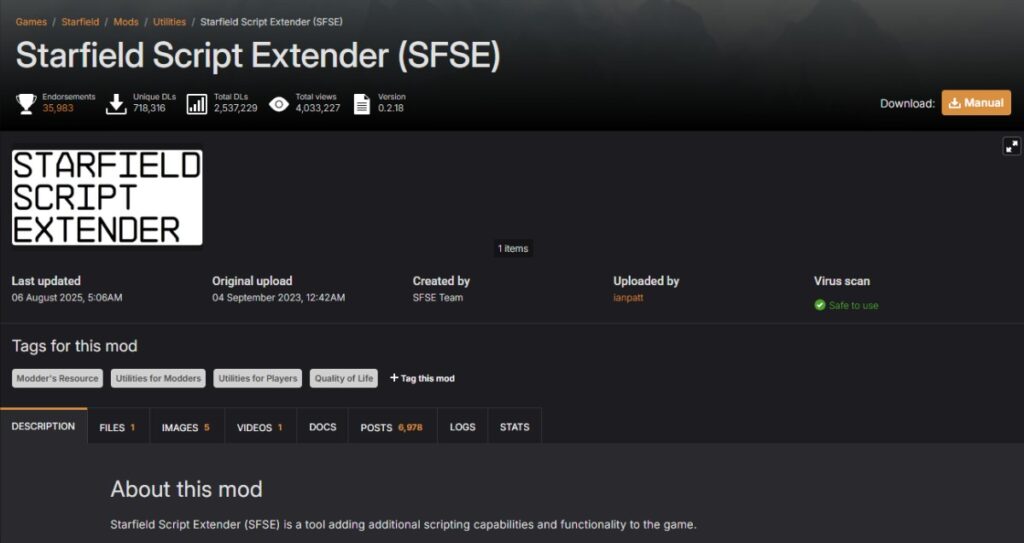
These are non-negotiable. Most modern Starfield mods depend on them, and installing them in the correct order prevents a lot of silent issues later. Always test the game after installing this group before moving on.
- Starfield Script Extender (SFSE) – Required for advanced scripting.
Works with: Address Library, most modern mods
Avoid: outdated plugins after game updates - Address Library for SFSE Plugins – Shared dependency for many mods.
Load after: SFSE
Required by: most script-based mods - Baka Achievement Enabler – Keeps achievements active while modded.
Works with: SFSE setup
Safe: does not affect stability
UI and Quality of Life (Safe Stack)

This is where Starfield improves the most on PC. These mods are lightweight, widely used, and do not conflict with each other when installed properly. This is your “daily driver” layer.
- StarUI Inventory – Better sorting, cleaner layout, faster comparisons.
Works with: StarUI HUD, Ship Builder
Load: after core frameworks - StarUI HUD – Removes clutter and improves readability.
Compatible with: all StarUI modules
Note: keep versions aligned - StarUI Ship Builder – Makes ship editing far less painful.
Safe: no known conflicts in this stack - Cleanfield (No Intro + Clean Menu) – Faster startup and cleaner menus.
Zero risk: no gameplay impact
Performance and Visual (Optional Layer)
Only install these if you actually need them. They do not affect save stability, but they can change how the game feels. Always benchmark before and after so you know if it is helping or hurting.
- DLSS (NVIDIA) – Improves performance with minimal visual loss.
Best use: Quality mode first - Frame Generation – Can boost FPS significantly.
Warning: may introduce input latency or artifacts
Light Gameplay Tweaks (Low Risk Only)
This is where people usually break their game. Keep this section small and controlled. Add one mod at a time and actually play for a while before stacking more.
- Small immersion tweaks (POI cooldowns, minor fixes)
- Non-script heavy adjustments
- Avoid anything labeled “overhaul”
Mods That BREAK This Setup (Avoid These)

This is where most mod lists fail you. These types of mods are the biggest cause of crashes, conflicts, and broken saves. If your goal is stability, skip them.
- Heavy overhaul mods – Too many systems changed at once
- Outdated SFSE plugins – Break after patches
- Conflicting UI mods – Especially outside the StarUI ecosystem
- Large script-heavy mods – Increase instability over time
Why These Mods Work Together
The reason this setup works is simple, it is built on dependency alignment and minimal overlap. Each mod has a clear role, and none of them fight for control over the same systems.
Frameworks sit at the top, UI mods sit in the middle, and optional layers come last. This keeps the load order clean and predictable. The fewer overlapping systems you touch, the fewer conflicts you create.
This is also why the list is small. Stability comes from restraint, not quantity.
Safe Install Order (Follow This Exactly)

If you install everything correctly, most problems never appear. Follow this order exactly and test between each stage.
- Install mod manager (MO2 or Vortex)
- Install SFSE and launch once
- Install Address Library
- Install Baka Achievement Enabler
- Add StarUI Inventory
- Add StarUI HUD and Ship Builder
- Add optional performance mods
- Add gameplay tweaks (one at a time)
- Test after each step
How This Setup Behaves on Real PCs

Modded Starfield behaves slightly differently depending on your hardware. The good news is this setup is lightweight and avoids most performance pitfalls.
Starfield tends to be CPU-heavy in cities and GPU-heavy in open areas. UI mods have almost no impact, while performance mods like DLSS can improve frame rates significantly. If you are not sure whether your system is being held back by the CPU or GPU, this quick breakdown helps you figure it out fast: is your CPU or GPU the problem during gaming.
Where you will notice changes is in RAM usage and load times. Modded setups benefit from fast storage and enough memory headroom. If your system starts struggling, background junk can interfere with modded games, so consider cleaning it up with this guide: disable bloatware on Windows.
Performance Checks
Even small hardware changes can make a noticeable difference in modded games, especially when you are pushing higher settings or longer load times. If you are unsure where to start, these cheap PC upgrades that actually improve performance are a good place to begin.
If performance still feels off, especially stutter or inconsistent frame pacing, this breakdown explains why: why your PC still feels slow after an upgrade.
To properly understand what is happening, you should monitor how mods affect your system in real time: monitor temps, clocks, and usage like a pro.
If Something Breaks, Do This
Even stable setups can break after updates. The key is not to panic and not to randomly reinstall everything. Work methodically.
- Disable half your mods and test
- Narrow down the problem by halving again
- Check mod pages for updates or known issues
- Wait for SFSE updates after game patches
If the crashes follow particular mods, use our step-by-step mods keep crashing guide to isolate the conflict. If Starfield remains unstable with the mods disabled and Windows also feels slow outside the game, use our guide to diagnose why Windows 11 is running slowly.
When You Should NOT Use Mods
Mods are great, but they are not always the right move. There are situations where staying vanilla is actually the smarter choice.
- First playthrough, experience the base game first
- Low-end systems with limited RAM or storage
- Right after major updates when mods are broken
If any of these apply to you, wait. A stable experience is better than a broken one.
Starfield Mods FAQ (2026)
If you still have questions about modding Starfield safely, these are the ones that come up the most. Keep it simple, and you will avoid most problems people run into.
Do Starfield mods break saves?
Yes, they can, but usually only when you install unstable or conflicting mods. A small, well-tested mod list like the one in this guide is very unlikely to break your save. The biggest risks come from removing mods mid-playthrough or using outdated plugins after a game update.
Do mods disable achievements in Starfield?
By default, yes. However, mods like Baka Achievement Enabler allow you to keep earning achievements while playing modded. Just make sure it is installed correctly alongside SFSE and updated after patches.
What is the safest mod manager for Starfield?
Both Mod Organizer 2 (MO2) and Vortex are safe. MO2 gives you more control and cleaner separation from your game files, while Vortex is easier to use for beginners. The most important thing is to pick one and stick with it.
How many mods is too many in Starfield?
There is no fixed number, but stability drops as your mod count increases. A focused list of 5 to 15 well-chosen mods is usually far more stable than a bloated list of 30 or more. More mods means more potential conflicts.
Should I mod Starfield on my first playthrough?
It is usually better to play the game vanilla first. This helps you understand what actually needs improving and reduces the risk of early crashes. Once you know the game, adding a small, stable mod list makes a lot more sense.
Quick Safe Setup Recap
If you just want the short version, here it is. This is the safest way to mod Starfield right now.
- Install frameworks first
- Use StarUI mods for UI improvements
- Add performance tweaks only if needed
- Avoid overhaul and script-heavy mods
- Test after every change
Keep it simple, keep it stable, and you will spend more time playing and less time fixing your game.
Other References
Most of the mods mentioned here can be found and verified on Nexus Mods, which remains the primary source for stable and actively maintained Starfield mods.Since updates can change how mods behave, it is worth keeping an eye on official patch notes via Bethesda’s Starfield page to understand when compatibility issues might appear.